- Services
The best open source OCR for AI agents in 2026: VLM vs traditional OCR, PaddleOCR, Docling, GLM-OCR, LangExtract, and a full document pipeline.
📝 Audio Version
Why AI Agents Fail at Reading Documents
Imagine your agent is processing an invoice. The subtotal and tax don't add up to the total, but your OCR layer reads the total as gospel. Your finance agent approves the wrong amount. Nobody catches it until the money is gone.
This still happens with the best LLMs on the planet. The problem isn't the model. The problem is what you feed it. If you want to build with AI agents on real documents, the choice of open-source OCR for AI agents is the single decision that makes or breaks the whole thing.
Modern LLMs are great at reasoning. They are terrible at recovering from broken inputs. When the OCR step drops a termination clause or invents an invoice total, the agent confidently approves the wrong thing. So the fix isn't a smarter agent. The fix is a better pipeline around it.
Here's the full stack, the open-source tools that actually work in 2026, and a free demo app you can download and build on at the end.
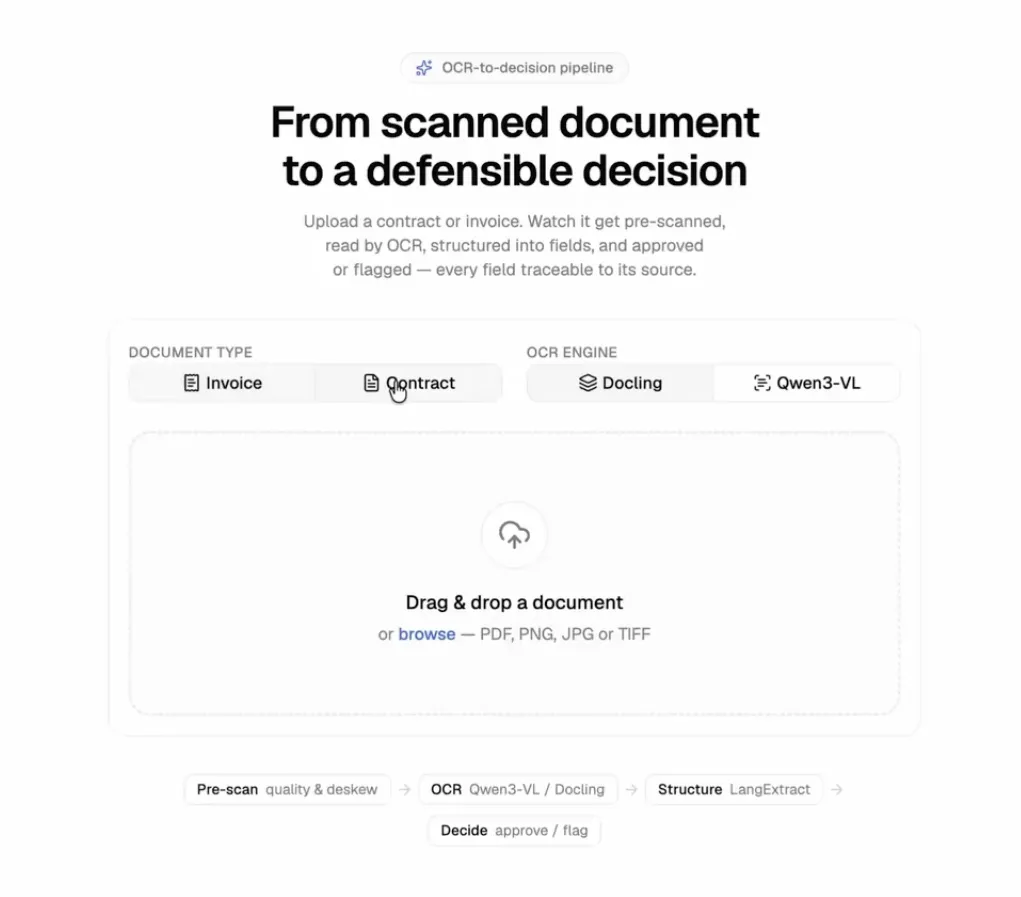
Document Approval Interface
OCR stands for optical character recognition. In plain terms, it pulls text out of images, PDFs, and scans so software can use it. Sounds simple. It isn't.
Real documents are messy. Tiny legal fine print. Handwritten notes. Tables with merged cells. Two-column layouts where you have to read all of the left column before the right one. Get the reading order wrong and an income statement can land a number under the wrong header. One column off is a real financial risk, not a typo.
Legacy OCR tools were built decades before AI agents existed. They were never designed to hand clean, structured output to a reasoning model. That mismatch is why most agents fall apart on documents.
In 2026, OCR no longer means "turn pixels into a blob of text." It means document understanding: layout, tables, formulas, reading order, and structured output an agent can actually use.
That shift matters because the leading new "OCR models" are vision-language models (VLMs). They look at the whole page like a human does and return Markdown or JSON in one pass. So the old "LLM versus OCR" debate is the wrong question. The best OCR today is an LLM that specializes in reading documents.
Here is what an agent actually needs from that step. Call it the agent's wish list:
If your OCR step delivers those four things, your agent has a fighting chance. If it doesn't, no model will save you.
The whole thing is a pipeline, and every stage can run on your own machine, fully private. That's the point of using open source OCR for AI agents: invoices, contracts, and medical records never leave your infrastructure.
Here are the stages.
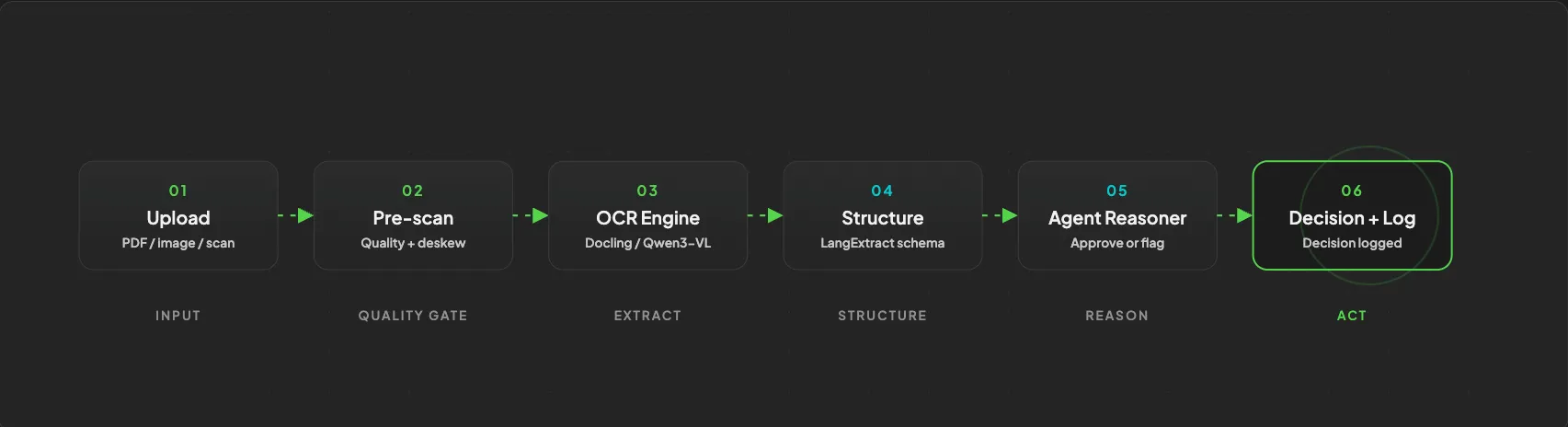
One pipeline, six steps, fully open source
The shift is from pure text extraction to document understanding. Every stage exists to protect the one that matters most: the agent's decision.
This is the question I get most, so let's settle it. The honest answer is that you pick based on the document and the stakes, and a lot of teams end up using both.
Tesseract has been the OCR standard for decades and it is still maintained, with around 74,000 GitHub stars and an Apache 2.0 license. EasyOCR is the other classic, simple to call from Python, though it has slowed down on updates.
These tools shine when the job is high volume and the documents are clean. Think searchable archives. A tool like paperless-ngx uses Tesseract so you can search across your entire document stack. For that, you don't need perfect table extraction. You need fast, cheap, local text, and traditional OCR delivers it on a CPU with a tiny footprint.
The catch: legacy OCR struggles with complex layouts, tables, reading order, and handwriting. On modern document benchmarks it scores far below the VLMs. So don't reach for it when accuracy on structure matters.
VLMs win whenever layout and meaning matter. Multi-column reading order. Nested tables. Forms. Mixed handwriting and print. Degraded photos of documents. They read the whole page in context and return clean Markdown or JSON with the structure intact.
And they have gotten shockingly good while getting smaller. In late 2025, PaddleOCR overtook Tesseract as the most-starred OCR project on GitHub, a symbolic changing of the guard after Tesseract held the crown since the 1980s 1. Tiny specialist models now top the charts: GLM-OCR, at just 0.9 billion parameters, sits at number one on the OmniDocBench v1.5 leaderboard 2, and PaddleOCR-VL 1.5 (also 0.9B) is reported to beat GPT-4o on document parsing 3. On the olmOCR-Bench, a 1B model now edges out a 9B one 4. Model size is no longer a reliable proxy for OCR quality.
Here's the honest limit. Traditional OCR fails by misreading a character. You can usually see it. A VLM fails by making something up.
When a VLM can't read a word, it doesn't leave a blank. It outputs something plausible and wrong, with full confidence. One practitioner doing genealogy work described a model inventing names and dates that "sounded right for the ethnicity and time period but were entirely fake" 5. Worse, VLMs can't reliably tell you how confident they are. Asking the model for a confidence score just gets you another made-up number. Tesseract's older model, for all its faults, actually knows when it's unsure.
This is exactly why the agent reasoner stage exists. It's a guardrail against confident, fabricated output, not just a nice-to-have.
Here are the tools worth your time, what they're for, and when I'd pick each. Benchmarks are a good starting point, but the real question is always what runs on your hardware at your volume.
PaddleOCR, from Baidu, is the most popular OCR toolkit right now (around 79,000 stars, Apache 2.0). It reads 100-plus languages, handwriting, and formulas. Its flagship VLM line, PaddleOCR-VL, is state of the art on document benchmarks at a tiny 0.9B size 3. If you want a production-grade, multilingual document-to-data engine, start here.
Docling, from IBM Research, is the one I'd hand most people first 7. It's fast, runs on a standard laptop, and does both extraction and structuring (PDF, DOCX, images, and more, out to Markdown or JSON). It uses RapidOCR under the hood, which is a fast repackaging of PaddleOCR models, so you're getting PaddleOCR-quality reading without the heavy setup. MIT licensed. In my own demo, Docling returned results in about four seconds on local hardware.
GLM-OCR (0.9B, from Z.ai) currently sits at the top of OmniDocBench v1.5 and adds key information extraction on top of plain reading 2. dots.OCR (around 1.7B, from RedNote's hi lab, MIT licensed) is a single compact model that handles layout, text, tables, and formulas across 100-plus languages. Both punch far above their size. Consider GLM-OCR if you have a slightly bigger machine and want benchmark-leading accuracy.
These three come from Datalab. Surya is the OCR and layout engine. Marker is the PDF-to-Markdown pipeline built on top of Surya, and it's a great fit for retrieval-augmented generation (RAG) where you just need clean Markdown. Chandra is the newest and highest-accuracy of the three, excellent at messy tables and handwriting. One important note: check the license. Datalab's model weights use OpenRAIL-M variants with revenue caps, so "open source" here isn't the same as Apache or MIT. Verify the weights license, not just the code, before you ship commercially 12.
Qwen3-VL, from Alibaba, is a strong general vision model with good OCR. It comes in sizes from 2B up to a 235B mixture-of-experts model, and you can run it via OpenRouter or self-host it. In my demo, I used a Qwen3-VL model through OpenRouter because it's cheap and saves me from managing a GPU, and it correctly picked up font weight and bold text in the output. The big variant is a top benchmark performer if you have the hardware 9.
Keep these in your back pocket for high-volume, clean, search-heavy work where cost and speed beat structure. They are the cheapest, lightest option, and for indexing huge archives they're still good enough.
Reading the page is only half the job. Now you need the same fields, every time, in a fixed shape your agent can trust.
LangExtract, from Google, handles this stage well 8. It's a small Python library that turns messy extracted text into structured data. You give it a few examples of what you want, and it repeats that structure reliably across every new document. The best part for agents: it grounds every extracted field back to its exact spot in the source. So when your agent cites "invoice total," it can point to where that number actually came from, instead of trusting a floating value.
1import langextract as lx23# Define the shape you want with a couple of examples,4# then run it over OCR output to get grounded, structured fields.5result = lx.extract(6 text_or_documents=ocr_markdown,7 prompt_description="Extract invoice number, subtotal, tax, and total.",8 examples=my_few_shot_examples,9)
This is the difference between "here's a wall of text, good luck" and "here are six clean fields with receipts." The second one is what an agent can act on.
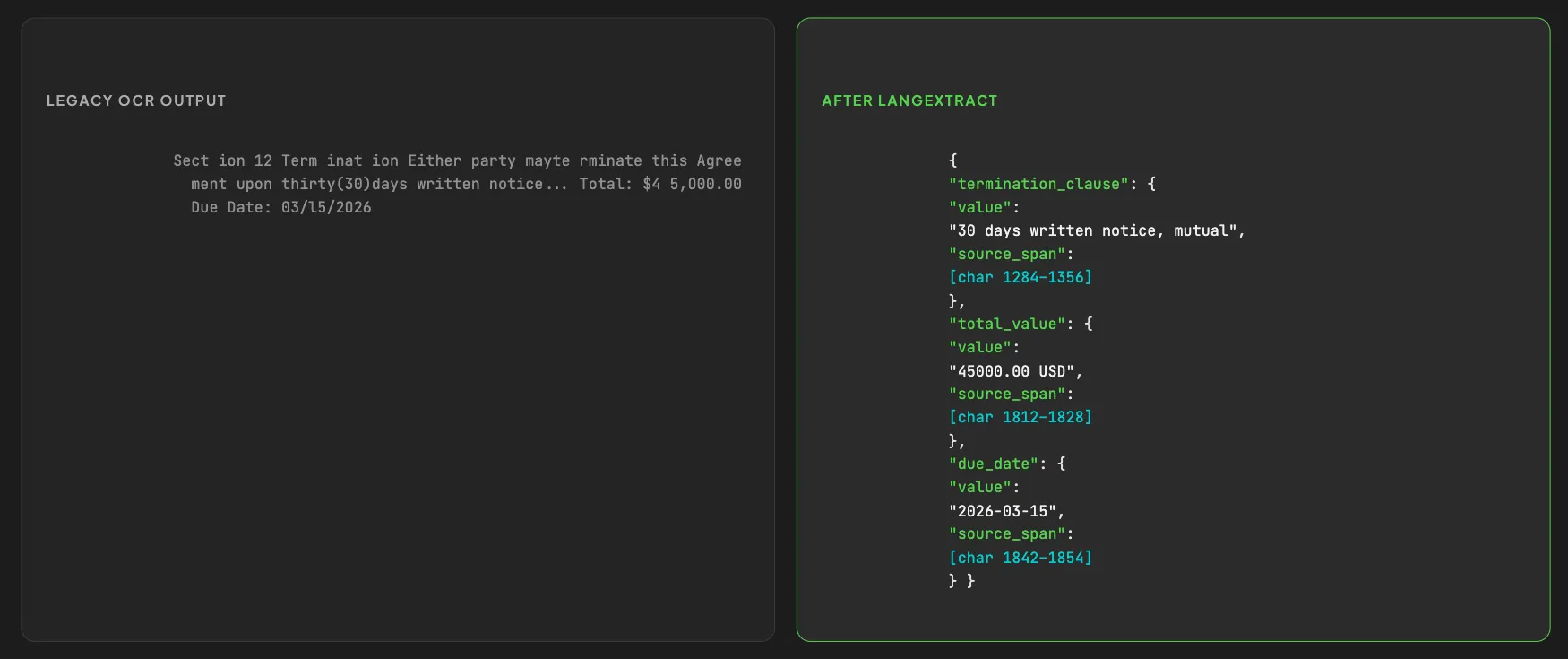
Raw OCR text vs grounded structured JSON
Now the payoff. The agent reads the structured output and checks it against your rules. If something is off, it flags the document and explains why, instead of rubber-stamping it.
In my demo I built two document types, invoices and contracts, each with its own rules. A few real examples from running it:
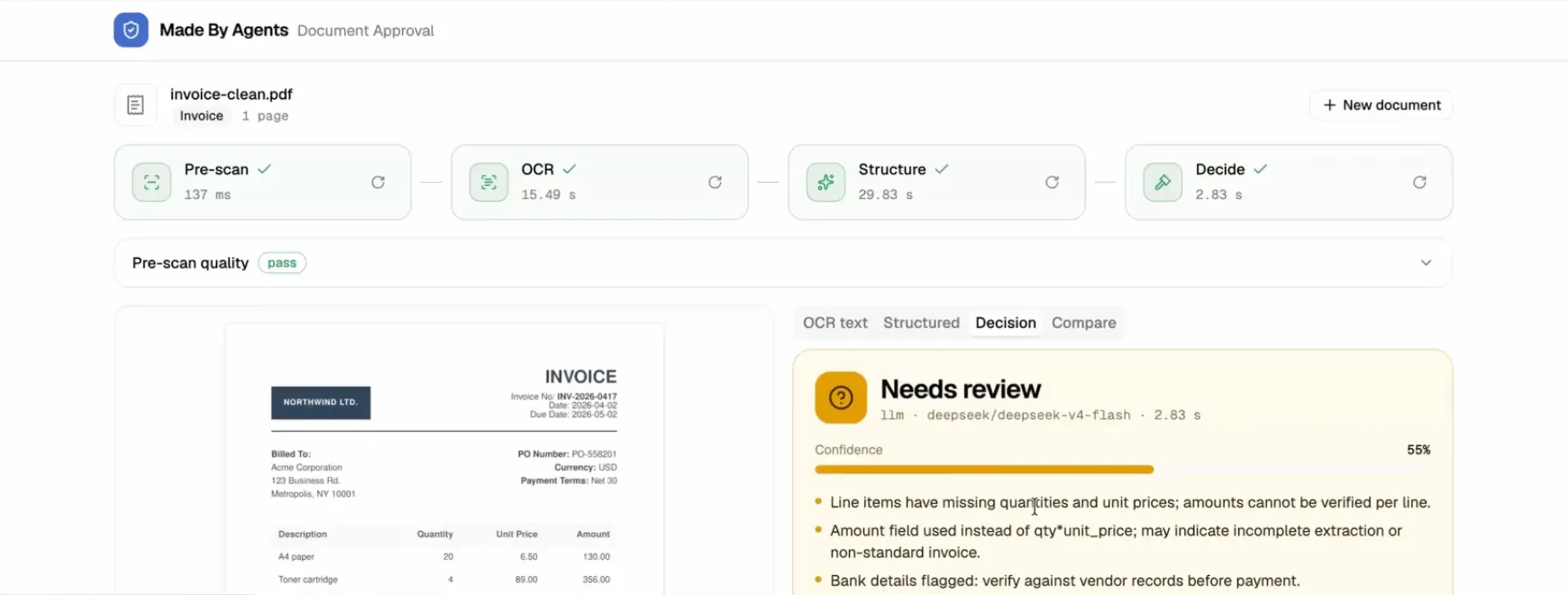
From a PDF to an approve or flag decision, end to end.
This is the layer that catches the hallucination problem from earlier. The OCR step extracts. The agent step reasons. Separating the two is what keeps a fabricated number from becoming an approved payment.
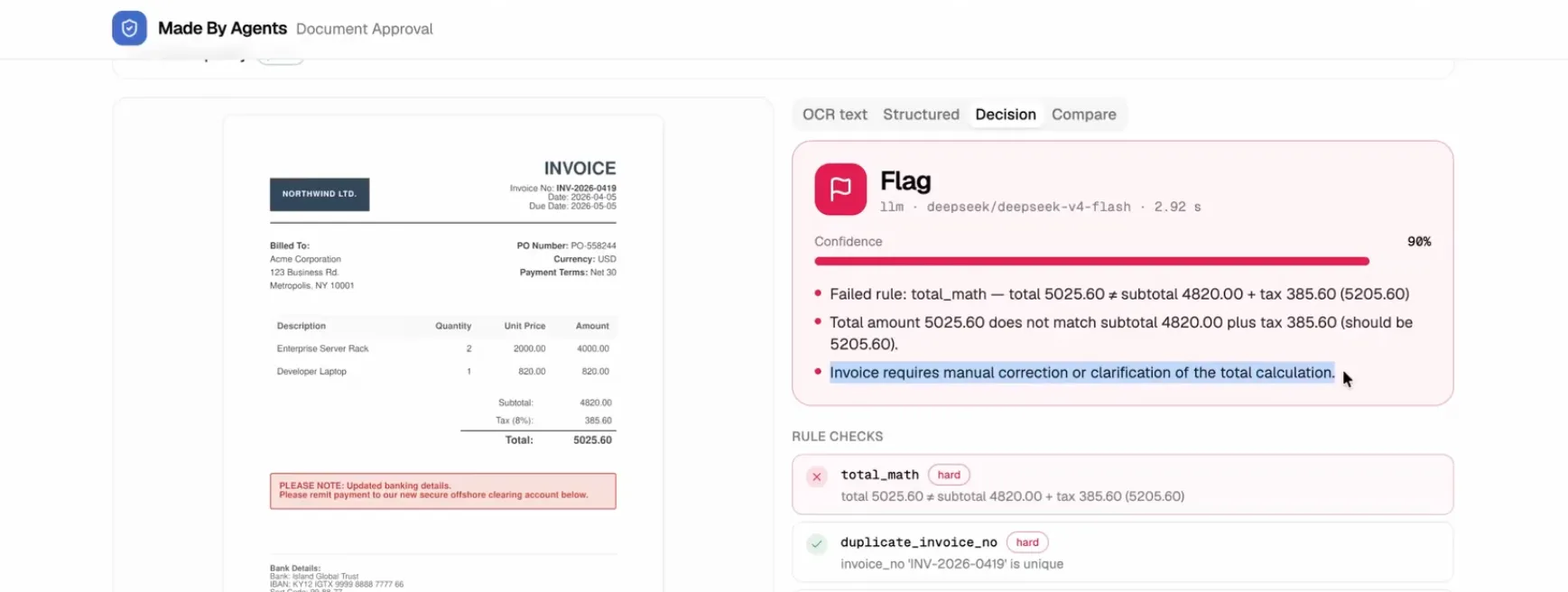
Invoice gets flagged because the total amount does not match the subtotal plus tax
For invoices, receipts, and contracts, accuracy matters more than speed, so this is VLM territory. Use Docling, PaddleOCR, GLM-OCR, or a Qwen3-VL model for the read. Pair it with LangExtract to pull exact fields with source grounding. Then let the agent validate the math and your business rules.
The pre-scan stage earns its keep here too. I ran a low-resolution invoice scan through the pipeline, and the pre-scan immediately warned that sharpness was low and the image was likely blurry. A powerful VLM could sometimes still pull data from it, while the lighter local model returned almost nothing. Knowing the input quality up front tells you when to trust the output and when to ask for a better scan.
The whole reason to choose open source here is often not cost. It's that sensitive documents never leave your servers. That matters for GDPR, HIPAA, and financial workflows. Most of these tools (PaddleOCR, Docling, dots.OCR, LangExtract) carry permissive licenses and can run fully air-gapped.
What hardware do you need? Roughly:
On cost, a rough rule: a hosted OCR API runs around $1 to $2 per 1,000 pages, while sending the same pages to a general frontier vision model can cost roughly 100 times more 6. Self-hosting a small model is cheaper still, but only once your GPU stays busy. At low volume you pay for idle time, so an API usually wins until you're processing very high, steady throughput.
Here's the short version, mapped to what you're building:
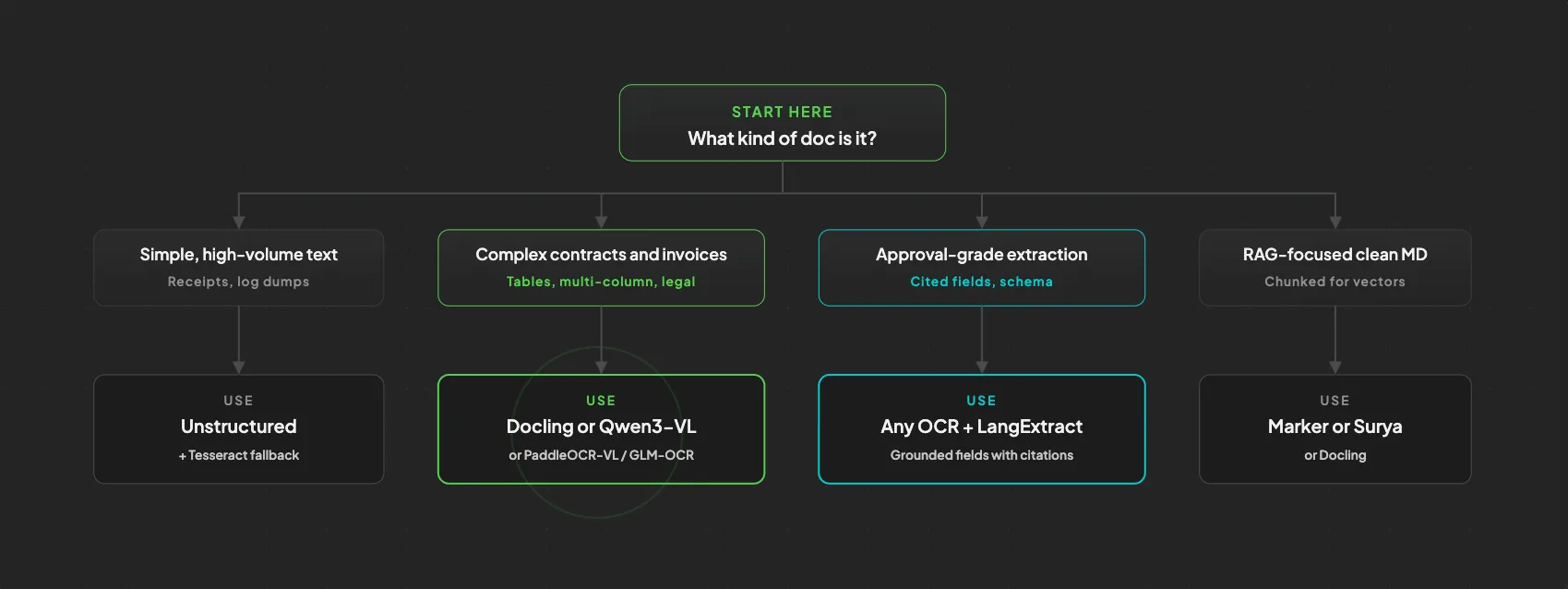
A 30-second decision tree
When in doubt, start with Docling locally, add a Qwen3-VL or GLM-OCR fallback for hard pages, and put LangExtract plus an agent reasoner on top.
Yes, and in 2026 the best OCR models are themselves vision-language models. The tradeoff is that they read layout and handwriting far better than legacy tools, but they can hallucinate and can't report calibrated confidence, so you need a validation layer for high-stakes documents.
For clean, single-column printed text and CPU-only or edge deployments, yes. It's still maintained and free. But it falls down on tables, complex layouts, and handwriting, so don't default to it for invoices or contracts.
Surya is the OCR and layout engine. Marker is the PDF-to-Markdown pipeline built on top of Surya. Both come from Datalab. Use Marker when you want clean Markdown for RAG, and reach for Surya when you need the lower-level engine.
Yes. Tesseract and EasyOCR run on a CPU, and Docling runs well on a standard laptop. The newest 0.9B VLMs also run on very modest GPUs. You only need serious hardware for the largest general models.
They're the two benchmarks worth watching. OmniDocBench, from OpenDataLab, scores end-to-end document parsing on hard real-world pages like nested tables and multi-column layouts 10. olmOCR-Bench, from the Allen Institute for AI, measures how well models extract content from diverse PDFs 11. Both confirm the same trend: small specialist models now beat much larger ones.
The lesson is simple. Don't ask one model to read and reason in a single shot. Split the work. Pre-scan the input, let a modern VLM do the reading, structure the output with LangExtract, and put an agent on top to approve or flag against your rules. That pipeline is the difference between an agent that quietly approves a wrong invoice and one you can actually trust.
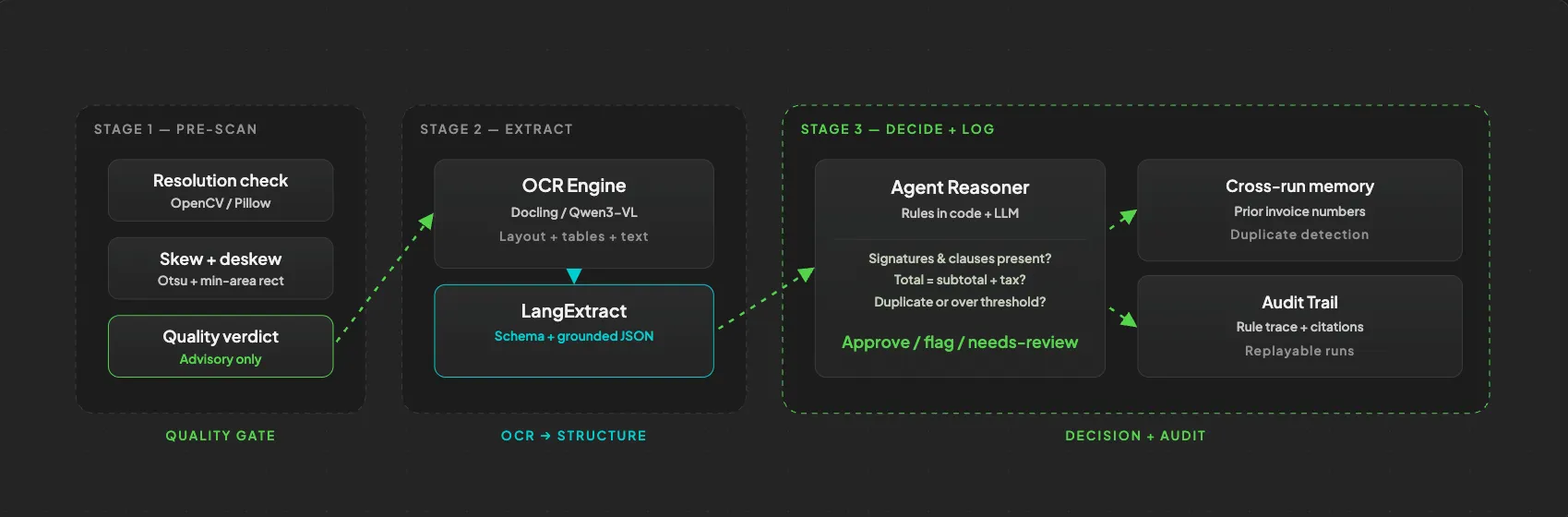
Pre-scan, parse, structure, reason, log
Best of all, every piece of this is open source, so you can run the whole thing privately on your own machine.
I built a working demo of this exact pipeline, with two OCR engines, the pre-scan checks, LangExtract structuring, and the agent reasoner for invoices and contracts. It's free and on GitHub. Grab it, run make install, and build on top of it.
Demo App: GitHub
About the author

Tobias Wupperfeld
Tobias is an independent AI engineer and operator who has shipped AI systems inside startups and scale-ups across fintech, procurement, engineering, and more. He runs Made By Agents focused on agentic coding and consults for companies, where he leads AI integration across processes and product lines.
Keep Reading
We write about coding agents, multi-agent systems, AI pair programming, and the engineering practices we use with clients. Hands-on lessons from real projects, not high-level theory.
Browse All Articles