- Services
Build a multimodal RAG with Gemini Embedding 2: search text, images, PDFs, video, and audio in one shared vector space. The open-source AI explained.
📝 Audio Version
Search visual data with Gemini Embedding 2
What if uploading one image could instantly surface every related report, spec sheet, and past version across your whole company? That is the thing I built, and in this post I will show you how. It is a multimodal RAG with Gemini Embedding 2 at its core: a knowledge base that stores text, images, PDFs, video, and audio in one place and lets you search across all of it. You can type a question and get back the right image. You can upload an image and get back the matching document. You can chat with your files and actually see the pages they came from.
The whole thing runs locally with a modern React interface and ships as a single Docker image. The code is open source. Let me walk you through why this works now when it did not before, and how the pieces fit together.
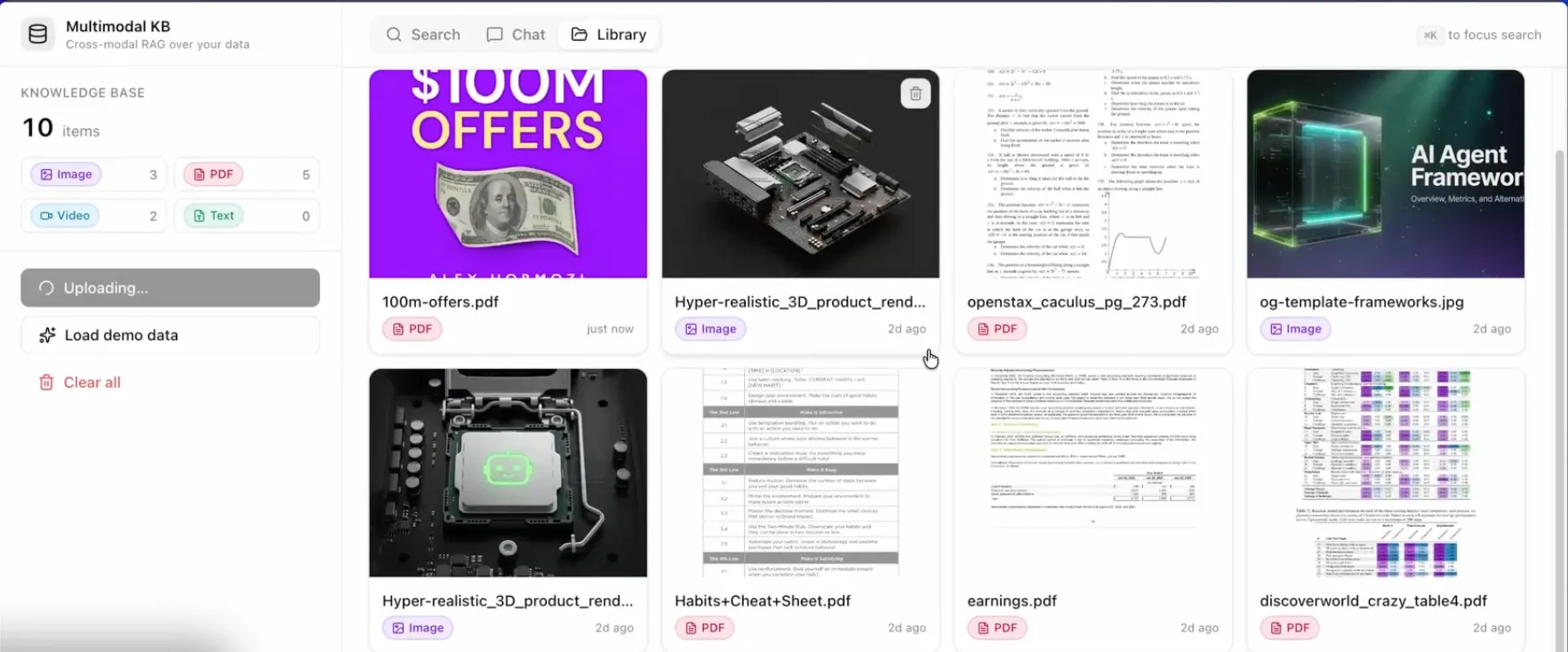
Library page of the knowledge base with the embedded files
Most knowledge bases only understand text. That is the problem.
The standard setup is called RAG, short for retrieval-augmented generation. In plain terms: you store your documents as numbers (embeddings), and when someone asks a question, the system finds the closest matching chunks and feeds them to an AI model to write an answer. It works great for text. It falls apart the moment your data is visual.
Think about what that means in practice. You have a PDF with a chart that holds the actual number someone needs. Text-only RAG reads the prose around the chart and misses the chart itself. You have designs in Figma, specs in Notion, and reports in Drive. You cannot put them in one searchable place because half of them are pictures. Diagrams, screenshots, scanned contracts, product photos: all invisible.
This is not a small gap. Industry estimates put 80 to 90 percent of enterprise data in unstructured, multimodal formats, while roughly 80 percent of RAG systems still only handle text 1. So most companies are searching a thin slice of what they actually own.
Before, the way around this was to glue two models together. You used something like CLIP to handle images, and a separate text embedding model for your documents. CLIP pairs a vision encoder and a text encoder and aligns them with training so they sort of agree.
The catch is you end up with two different vector spaces. Image numbers live in one space, text numbers in another. To search across both, you write a pile of custom logic to combine and reconcile the results. It is fragile, and image retrieval often comes back worse than text retrieval anyway. More on why that happens later.
Multimodal RAG is retrieval-augmented generation that searches over text, images, PDFs, video, and audio together, instead of text alone. One model turns every file type into numbers in the same shared space, so a single query can pull the most relevant result no matter what format it lives in.
The difference from regular RAG comes down to three things:
An embedding space is just a map where similar things sit close together. A shared embedding space means text and images and video all get placed on the same map.
That is the whole trick. When a photo of a chip and the words "photo with a chip" land near each other on the same map, you can search one with the other. No translation layer. No merge logic. They already speak the same language from the start.
Gemini Embedding 2 is Google's first natively multimodal embedding model. One model maps text, images, video, audio, and documents into a single shared space across more than 100 languages 2. It launched in public preview on March 10, 2026, and later reached general availability through the Gemini API and Vertex AI.
"Natively multimodal" is the key phrase. It is built on the Gemini foundation model, not bolted together from a vision encoder and a text encoder like CLIP. The cross-modal understanding is baked in end to end. That is why it skips the two-space problem entirely.
One thing to keep straight: do not confuse it with the older gemini-embedding-001, which is text only, or with EmbeddingGemma, which is a small open text-only model for on-device use. Despite the similar names, only Gemini Embedding 2 handles images, PDFs, video, and audio. If you pick the wrong one, none of this works.
It is also not the only player. Cohere Embed 4 and Voyage multimodal-3 are native multimodal embedders too, and there is a separate school of thought (ColPali, ColQwen2) that treats whole pages as images. Gemini Embedding 2 is a strong option, not the only one. I picked it because the quality is excellent and the API is simple.
Here are the per-request limits you actually need to know when building 2:
Pricing is metered per modality, per million tokens: about $0.20 for text, $0.45 for images, $6.50 for audio, and $12.00 for video, with a 50 percent discount on the Batch API 3. Treat those as point-in-time numbers and check Google's pricing page before you scale. Video and audio are the expensive ones, which matters for how you chunk them.
By default the model outputs a 3,072-dimensional vector. That is a long list of numbers per item, and storing millions of them adds up.
Here is the clever part. Google trained it with Matryoshka Representation Learning, or MRL. The name comes from the nesting dolls. The most important information is packed into the front of the vector. So you can chop the vector down, say to 768 dimensions, and still get excellent retrieval quality 4. Google recommends 3,072, 1,536, and 768 as the solid tiers.
I use 768 in this project. You get strong semantic understanding while keeping the vectors small, which means faster searches and lower storage costs in your vector database. The original MRL research reported up to 14 times smaller embeddings and 14 times faster retrieval at the same accuracy 4. That is a real win for almost no downside.
Cross-modal retrieval means searching one type of content with a different type. You search with text and get back images. You search with an image and get back text. Because everything sits in the same shared space, the system just looks for the nearest neighbors regardless of format.
The flow is simple:
In my demo I typed "photo with a chip" and the top result was exactly that, a photo of a chip. Then "photo with a motherboard" pulled up the motherboard shot. No tags, no captions, no manual metadata. The model understood the picture when it was ingested.
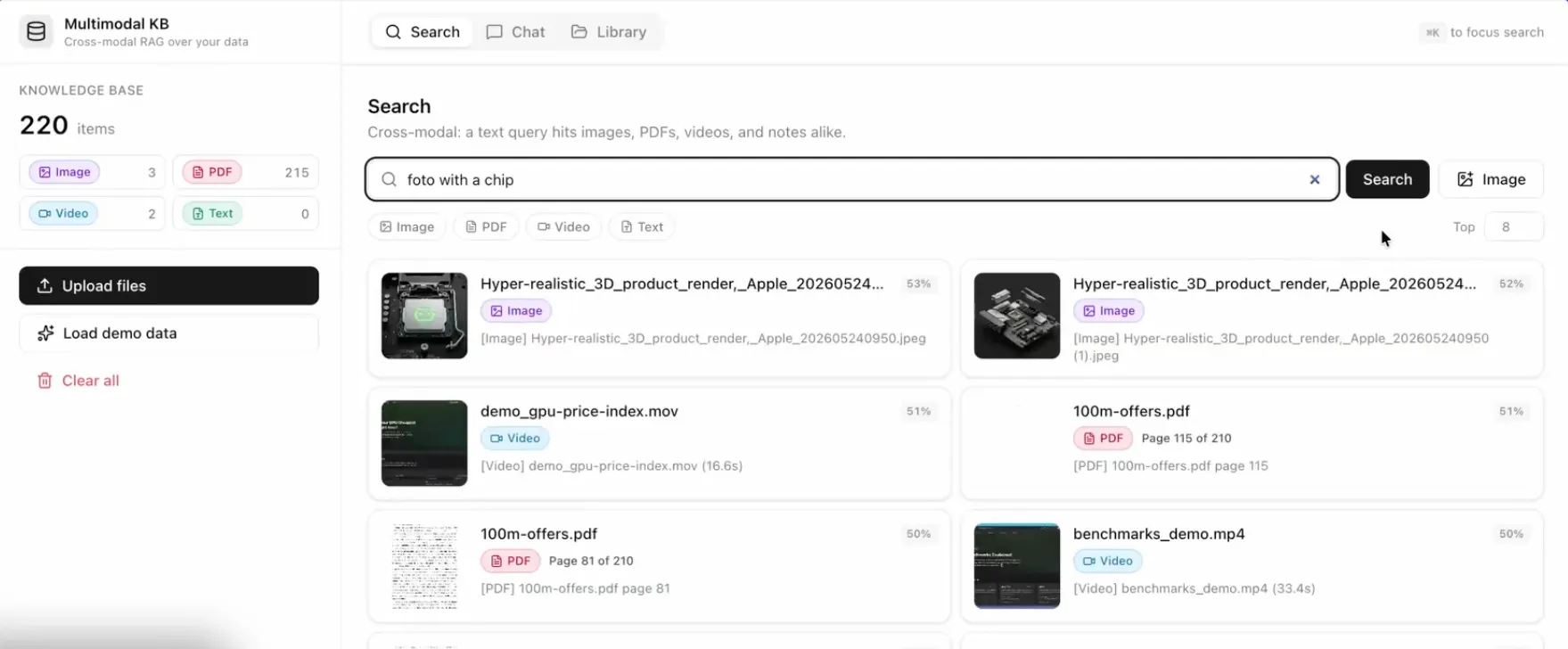
Search results after searching for "photo with a chip"
Same idea, reversed. You embed the uploaded image instead of text, then find the nearest neighbors. I took a screenshot of a graphic and the system pulled up the exact pages in a 200-plus-page PDF where that graphic appears. It found it on several pages, because the content matched on all of them.
That is the moment the whole approach clicks. One image in, every related document out.
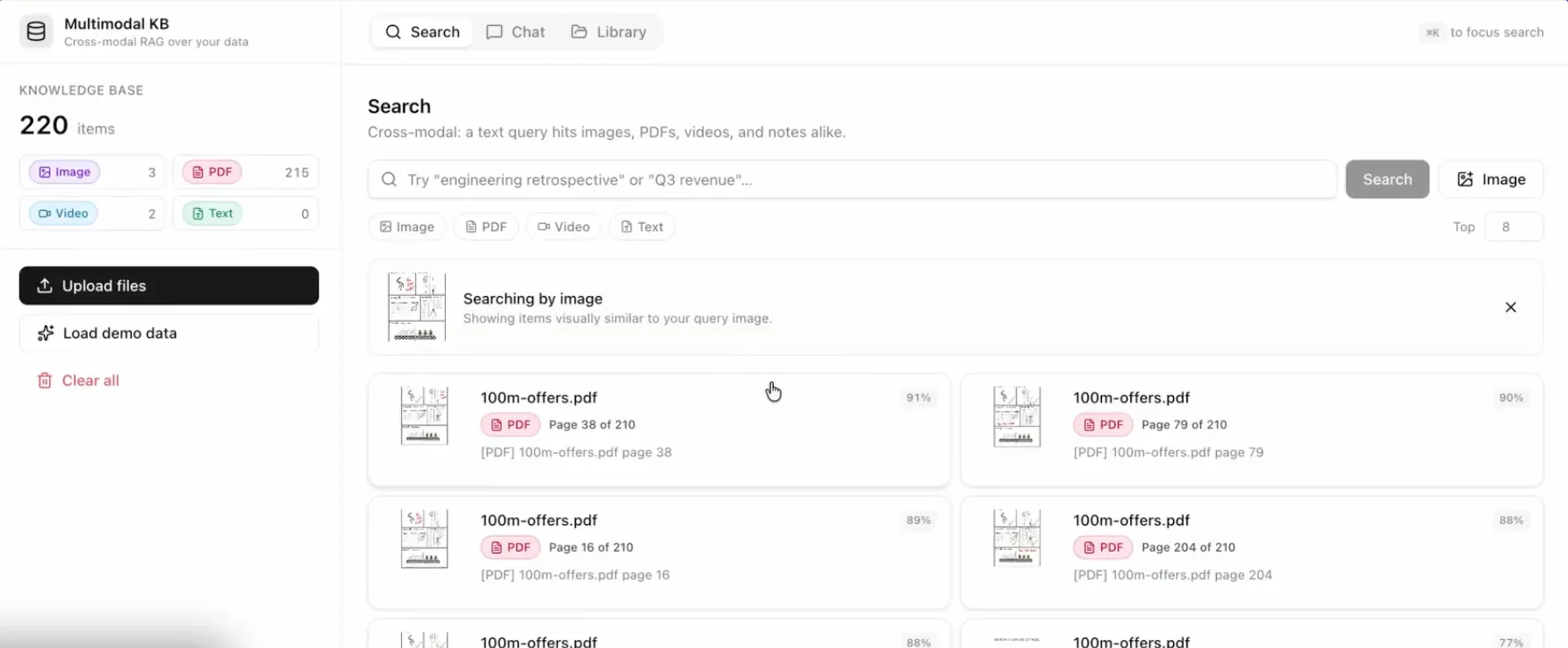
Searching by image
For the vector database I used ChromaDB. It is open source, easy to start with, and you can install it with one command. It keeps things in a single directory so there is no heavy infrastructure to stand up while you are building 5.
The pattern is straightforward: write a custom embedding function that calls Gemini Embedding 2, then store the resulting vectors in a Chroma collection along with metadata like the file name and, for PDFs, the page number.
1import chromadb23client = chromadb.PersistentClient(path="./kb")4collection = client.get_or_create_collection("knowledge_base")56# embed_with_gemini() calls Gemini Embedding 2 and truncates to 768 dims7collection.add(8 ids=["offers_book_p42"],9 embeddings=[embed_with_gemini(page_image, dimensions=768)],10 metadatas=[{"source": "100m_offers.pdf", "page": 42, "type": "pdf_page"}],11)
ChromaDB stores the embeddings and metadata, not your original images and PDFs. The raw files live wherever you keep them, like object storage or a local folder, and you point to them with a path or URL in the metadata. So when a search returns a hit, you use that metadata to fetch and show the real file. Plan your storage with that split in mind.
The per-request limits decide your chunking strategy.
For PDFs, the cap is 6 pages at once, so larger files have to be split. I split them page by page. It costs a few more embedding calls, but the payoff is big: I can retrieve the exact page that matches a query and I always know which page it came from. That beats retrieving a giant blob and making the AI hunt through it.
For video, the cap is 120 seconds. You have two good options. If a clip is under 2 minutes, embed the whole thing. For longer or more precise needs, extract frames at regular intervals, embed those frames as images, and store the timestamp with each one. Then a query can jump to the exact moment in the video. Audio works the same way under its 180-second limit.
For finding the right content, you only need multimodal embeddings. The embedding model handles retrieval. The multimodal LLM matters at the next step, when you want the AI to read the retrieved images and pages and write an answer about them.
So in this build, Gemini Embedding 2 does the searching, and a vision-capable model does the chatting. In the demo I asked for "a graphic where Hormozi explains the 100 million offer model" and got a text summary plus the relevant pages. I asked for "the video where I show AI benchmarks" and it pulled up the right screen recording. That is chat with vision: the answer and the source images, together.
Worth saying plainly, because it trips people up. With the old CLIP-style setups, image and text vectors tend to cluster apart even in a shared space. People call this the modality gap. CLIP also tends to over-score generic-looking images, so you get visually bland results that do not actually match the question.
Native multimodal models like Gemini Embedding 2 narrow that gap a lot, which is the main reason I moved off the two-model approach. If you do hit weak image results, the common fixes are reranking the top candidates and adding keyword (hybrid) search alongside the vector search. One honest caveat: most rerankers today are still text-only, so reranking across images and text is not yet plug-and-play.
The stack is deliberately simple. Four layers:
The backend exposes the three endpoints any RAG app needs: one to ingest files, one to search, and one to generate a chat answer. The chat answer streams back token by token using Server-Sent Events, so the reply appears as it is written instead of after a long wait. The frontend gives you the upload box, the search bar that also accepts an image, and the chat window.
I always start with a task list. I have my coding agent write a detailed, step-by-step plan first, and I tell it to write that plan for an AI agent, not for a human. The tone is imperative: do this, then do this. It is shorter, it saves tokens, and it leaves no room for the agent to guess.
In the first prompt, I roughly described the architecture I wanted, after doing a bit of research up front. The agent turned that into a task document with the key features, the components like Server-Sent Events, the exact stack for the backend and frontend, the API endpoints, the schemas, and the layout.
Then I work through it in phases instead of asking for everything at once. Phase one is the backend skeleton. Then the backend routes. Then the frontend. Then the frontend hooks and API layer. Then the components. Then I wire both sides together, and optionally dockerize it. Going phase by phase keeps the agent's context clean, and it stays far more accurate that way.
Two parts of that task document earn their keep. A verification checklist, so the agent can confirm each phase works. And an out-of-scope list, so it does not wander off and add authentication or features I never asked for. That list is the difference between a focused build and a hallucinated mess.
If all your data is plain text, you do not need any of this. Text-only RAG is simpler and cheaper, so use it.
You need multimodal RAG when your real content is visual or spoken: scanned documents, screenshots, charts and tables, product photos, design files, recordings. That is most companies, which is the whole point. The information you most want to search is the information text-only systems cannot see.
This is a starter, not a finished product. The obvious next steps are richer timestamps for video frames, an OCR pipeline with stronger models for handwriting and complex tables, and agentic workflows so your AI agents can query this knowledge base on their own.
Everything here is open source except the Gemini model itself. I turned the project into a template you can clone and build on. Grab it, point it at your own files, and you have a knowledge base that finally understands all of your content, not just the words.
Starter Template: GitHub
About the author

Tobias Wupperfeld
Tobias is an independent AI engineer and operator who has shipped AI systems inside startups and scale-ups across fintech, procurement, engineering, and more. He runs Made By Agents focused on agentic coding and consults for companies, where he leads AI integration across processes and product lines.
Keep Reading
We write about coding agents, multi-agent systems, AI pair programming, and the engineering practices we use with clients. Hands-on lessons from real projects, not high-level theory.
Browse All Articles