Jev vs Laya vs Kev for Quote Automation
Typesafe Jev vs Laya vs Kev on real quote requests. Where a decision model helps, and where your own rules still send, hold, or forward to a human.
Last updated: Sep 26, 202616 mins read
Table of Contents
📝 Audio Version
The Future of AI Is a Bouncer
A quote request comes in. A buyer asks what a pump like last year's will cost, or a maintenance customer writes that the rooftop unit is grinding. Jev vs Laya vs Kev is the comparison I ran to see what can sit in front of that request and make a judgment. Jev is the hosted model from TypeSafe. Laya and Kev are the local ones I could run on my own machine. None of them write the quote.
Jev is not a chat model. TypeSafe calls it a System One model: a decision layer for software. You give it the facts you already have, plus questions whose answers you listed in advance. It returns a probability, a choice, or a score. Your own code decides what happens next. A normal chat model, if you need one at all, writes the email only after that decision.
The launch post on X, from TypeSafe founder Diogo Almeida on 15 September 2026, picked up about 39.5 million views. The claims in that post are large: 20 to 200 times faster than frontier chat models, and 40 to 400 times cheaper, with output tokens free 1. I wanted to see where that is actually useful in a business process, and where a smaller model on a Mac is enough.
Jev answers a question you have already shaped. It does not draft a paragraph, and it does not pick its own next step.
TypeSafe's docs describe it as a function call with frontier-level judgment on a narrow job: unstructured state in, a typed decision out 2. The state is whatever you already store. A support ticket. A code diff. A request for quote. An email. A row from your account system. You send that once, and you can ask several questions about it in the same call.
The name System One comes from Daniel Kahneman's split between fast judgment and slow, deliberate reasoning. Jev is named after William Stanley Jevons, the economist behind the idea that a cheaper resource gets used more, not less 2. The practical reading is even simpler. Jev is the fast check.
A request has three parts. The model name, the state, and a map of questions. On OpenRouter, where I wired the demos, the model id is typesafe/jev-1.13 and the call goes to the Decisions API, not to the chat completions endpoint 3. TypeSafe's own API is POST /v1/systemone with jev-latest or the pinned id jev-1.13.0 4.
Each answer comes back under the question id you chose. A choice includes the winning option and a probability for every option. A yes-or-no answer is a single number from 0 to 1. A score is a point on a scale you defined, and it can land between two levels. There is no explanation attached.
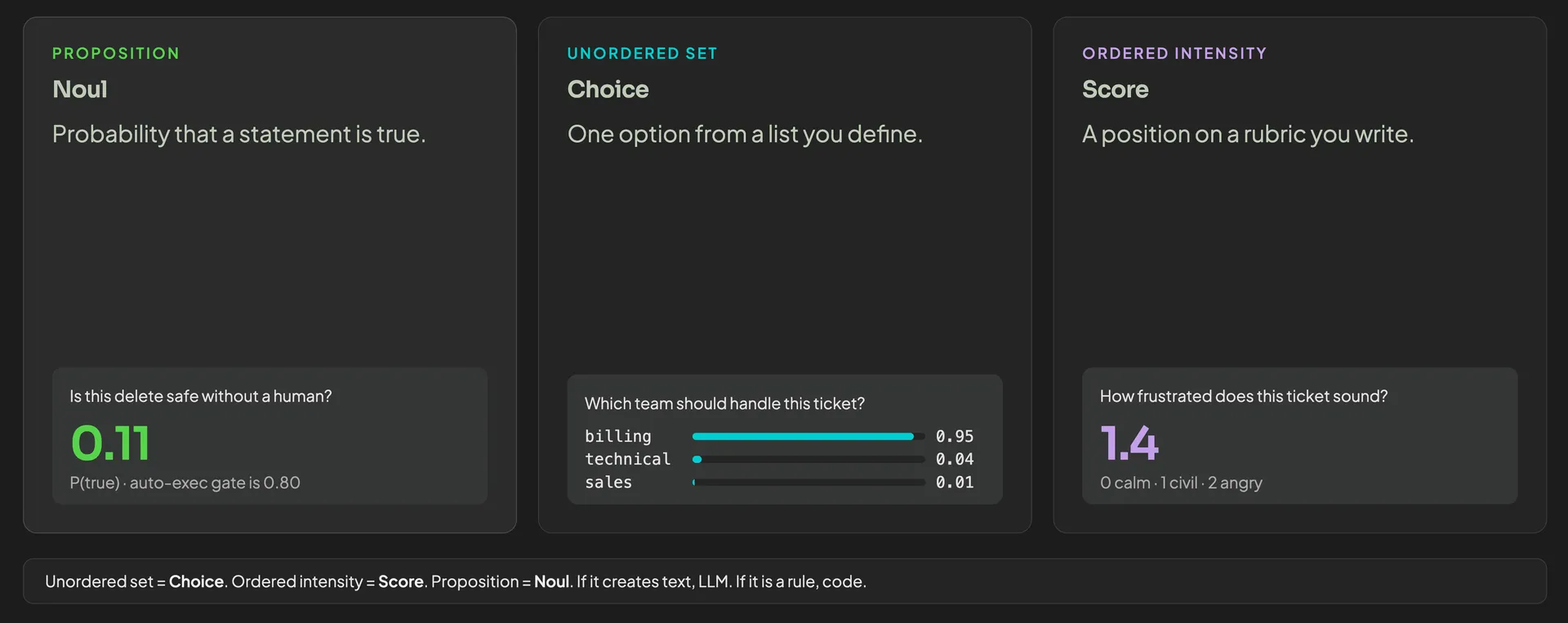
Jev's 3 primitives: Noul, Choice and Score
Use Jev when the next step is a branch your code already understands. Which route to take. Whether this request is complete enough to price. Whether a person has to see it before anything is sent. Use a chat model when a person is going to read the output. Use neither when a lookup, a price book, or a date comparison can decide it exactly.
That difference is the entire architecture:
- State. The incoming request, plus the account, the rate card, and the policy you already trust.
- Judgment. Jev scores the parts a regex cannot see. Tone, product family, whether the spec is usable, whether this is even your trade.
- Your gates. Ordinary if-statements. You set the thresholds and guardrails.
- A chat model, only if a person needs to read it. A cover letter. A clarification email. Called after the route is chosen.
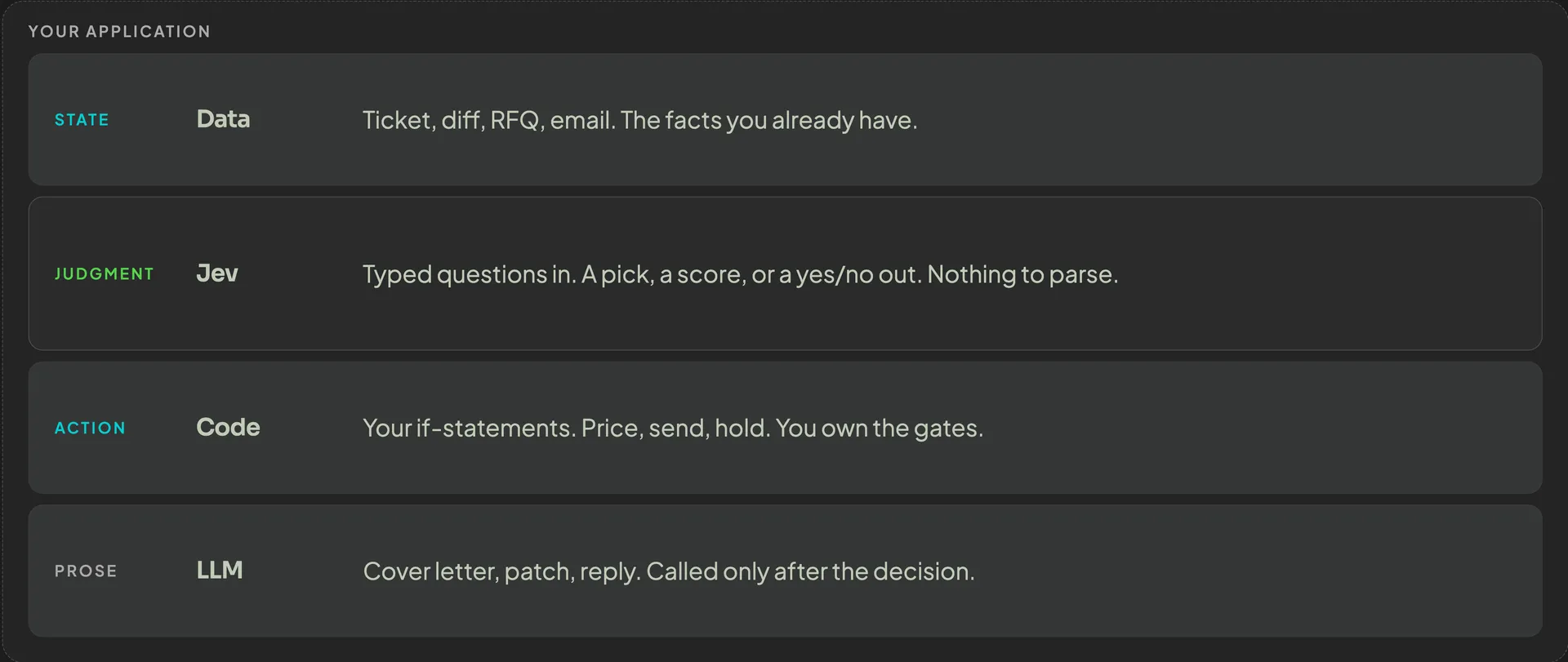
Jev's role in the application layer.
TypeSafe's own notes on Jev 1.13 say not to ask the model for something code can compute, and that extra unrelated text in the state makes the judgment worse 5.
On one classification set OpenRouter published, Jev scored 81.0% against Claude Opus 5 at 84.4%. Median latency was 175 ms against 2,266 ms, and the billed cost was about $0.11 per 1,000 requests against $2.42 6. A few points of accuracy, a large gap on speed and cost.
TypeSafe calls the three answer types primitives. A choice picks options from a list. A Noul is a yes-or-no probability. A score places the text on an ordered scale 7. You can ask all three about the same state in one call. They are judged independently.
You name the options. Jev returns a probability for each, and the option it would pick.
A support ticket is the clean example. The question is which team should handle it: billing, technical, or sales. On a billing complaint, a result might be 0.95 billing, 0.04 technical, 0.01 sales. Your code routes to the department that received the highest probability.
A Noul is one number. Near 1 means the statement is likely true. Near 0 means it is likely false. Near 0.5 means the model is split, and that is a reason to stop 8.
Ask one thing. "Is it safe to delete all customer data without a person's approval?" is a fair Noul. If the answer comes back at 0.11, you do not delete anything. You might auto-execute only when the probability is at least 0.80, and you would still want a second check on a question like that. The threshold is up to you. TypeSafe's docs use the same idea: raise the bar when a false yes is expensive, and lower it when missing a true yes is expensive 8.
There is no separate confidence field on a Noul. The number is the probability of yes. It is not a measure of degree. "Is this customer angry?" as a Noul tells you how likely "angry" is, not how angry they are. If you care about the degree, use the Score primitive.
You define the levels. Zero is calm. One is civil. Two is angry. Jev can answer 1.4, which sits between civil and angry, and it also returns how it split the probability across the levels 7.
That is useful when your team already works with a scale. Completeness of a spec. Urgency. How much you trust a match against the catalog. "At 1.4 or above, a human reads this before we reply" is a policy. The model only supplied the 1.4.
The model never opens a ticket, never sends mail, and never changes a price. It fills in the judgment the rules were going to read. One question per decision.
TypeSafe's launch post says Jev cannot hallucinate, because the answer has to be one of the types you defined 2. That part is true: you will not get a paragraph where you asked for a probability, and you will not get a team name you did not list. It does not mean the judgment is right. The docs say calibration is measured across many predictions, and a single answer can still be wrong 7.
The first demo is a mid-size industrial manufacturer. The products are process skids, pumps, heat exchangers, that kind of machinery. A request is often a short email plus a data sheet, and the honest answer is sometimes "an applications engineer has to finish this."

Jev runs in three batches. The pricing engine and the document are ordinary code. A chat model writes the quote the customer will read.
On the run I showed, the email asked for a pump similar to last year's, listed some specs, said site installation was not included, and pointed at an attached data sheet. The account lookup found an existing customer. Then the first judgment landed:
- Product family: process skid, at 82%.
- Completeness: 96%, read as usable with assumptions.
- Regulatory exposure, urgency, and site work, each as its own question.
Those numbers cleared the rule for "assign applications engineering," so the pipeline continued. It did not skip the engineer.
Next the catalog match ran in code: candidate equipment, lead times, what is stock against what has to be configured. The second Jev batch judged that match.
- Fulfillment: 66% that this order needs an engineer, rather than shipping from stock or a standard configure-to-order build.
- Trust in the bill of materials without an engineer checking it: at the top of the scale on that run.
- Whether a drawing was required: yes, so an engineering ticket was opened.
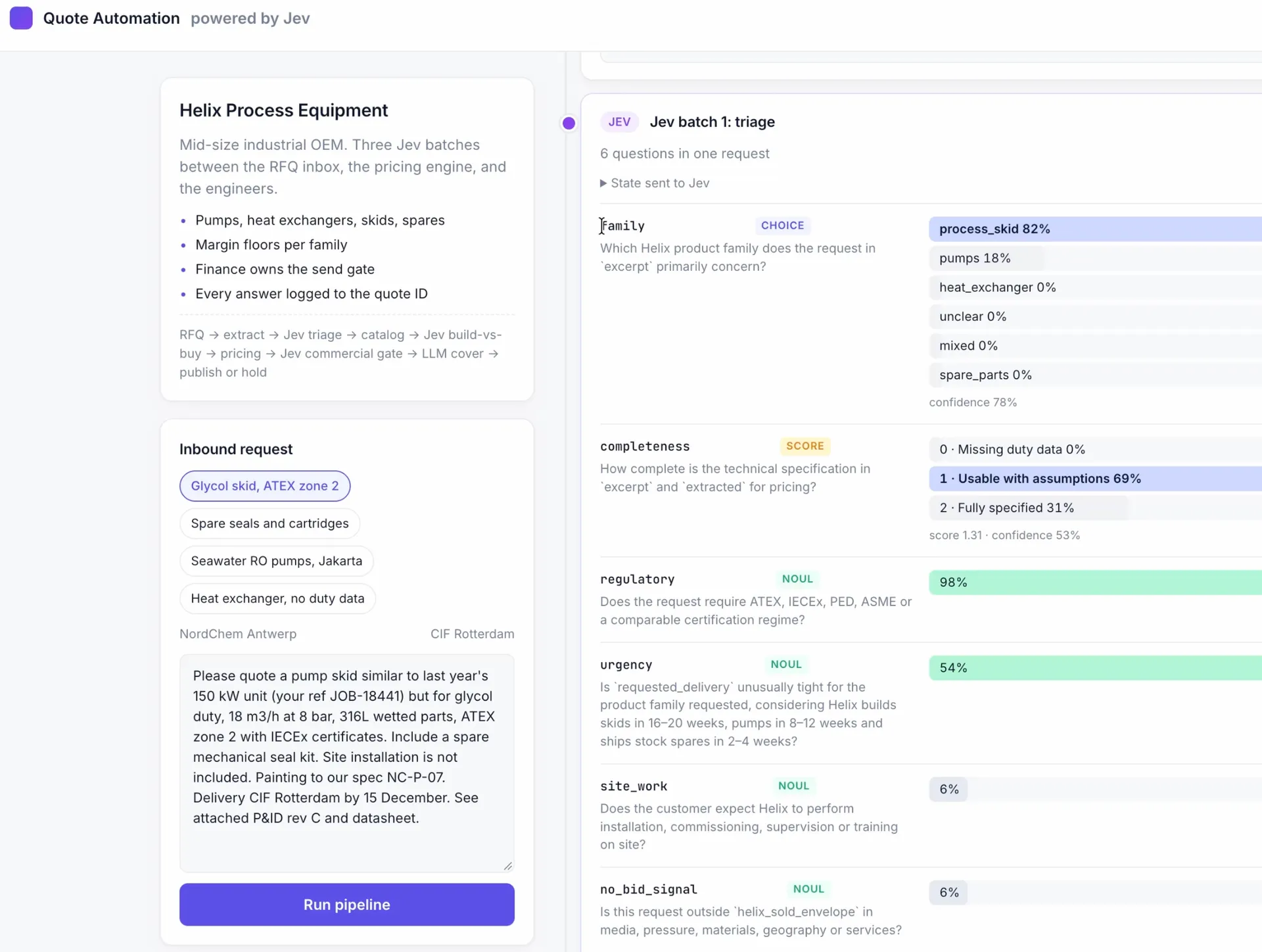
Jev running checks for quote creation for an industrial equipment manufacturer.
High trust in the bill of materials did not override the fulfillment call. Both numbers were inputs. The rule still opened the ticket. The chat model then wrote the open questions for that engineer. Glycol concentration and the fluid data at operating temperature. Motor electrical supply. What the customer still has to confirm. Jev had already decided it needs to be routed to an engineer to finalize it.
The pricing engine ran after that, from the company's own rates. The third Jev batch was the commercial gate. Which discount band applies, given the account and the product family: key account, at very high confidence. Payment risk. A handful of yes-or-no checks against the finance policy. The code applied the financial gate and concluded hold. Ready for applications engineering.
The quote document was filled in anyway. The chat model drafted the cover letter. Thank you for the inquiry. The quotation includes the skid, base, and paint. Site installation is excluded. Commissioning and civil works are excluded. Pricing is in the attached quotation. That package went to the engineer. It did not go to the customer. The letter was ready, the price was computed, and Jev's answers had blocked the send. The engineer adds what is missing and releases it.
A second request on the same app: The spec was complete, the unit was stock or a standard configure-to-order build, and every finance rule cleared. The quote went out without a sales engineer reading it. On that run Jev took about 1.5 seconds, on a small input. The customer would have had the email a few seconds later.
That is the value I want to point out. Not that every quote is sent automatically. That the incomplete ones arrive on an engineer's desk already classified, priced as far as the data allows, and with the missing questions written down.
The second demo is a 22-person HVAC contractor. Heating, ventilation, air conditioning. The offer is simple, which is why the gate can be strict. A service-call fee, then an hourly rate. After-hours work costs more. Two open slots a week. The auto-send threshold is 0.85. Below that, nothing goes to the customer automatically.

The first email was from a current maintenance customer. Grinding noise on the rooftop unit. The account lookup ran first, in code. Then Jev:
- Job type: service call, at 100%.
- Enough detail to price: 90%.
- Same-week delivery: 89%.
- Safe to send automatically: 90%.
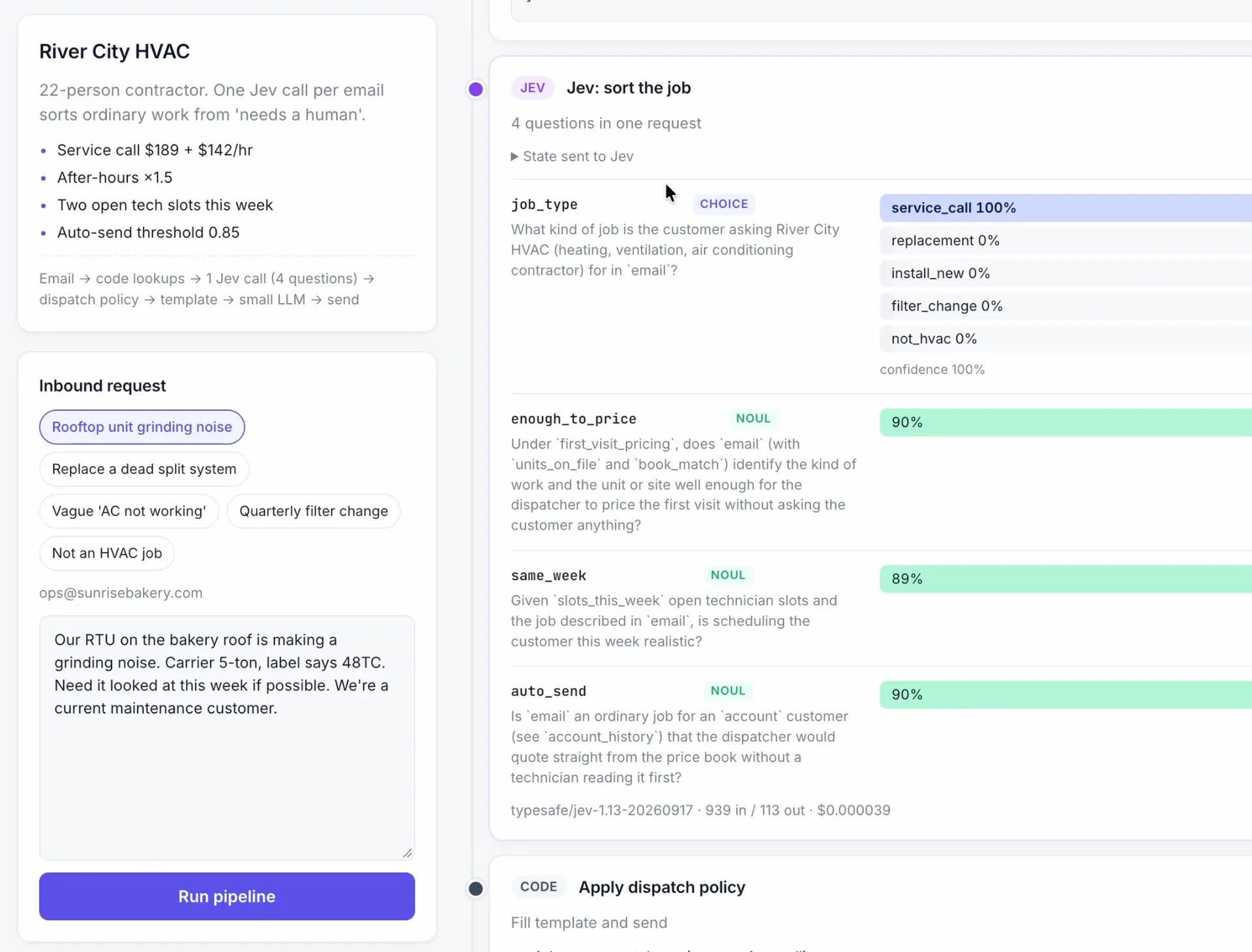
Jev deciding on the parameters for a quote request for an HVAC business.
Every figure cleared 0.85, and the dispatch rules executed. The template was filled, the chat model wrote the short reply, and the quote went out.
The second email was: "Hi, the AC isn't working right. Can someone come by and take a look? Thanks." Still a service call. Not enough to price. The pipeline did not invent an hourly total. It sent a clarification and asked for four things. A photo of the unit's data label. Whether the unit is on the roof or at ground level. Hours of operation. How to access the unit. When the customer answers, the same pipeline runs again. If the new mail clears the bar, the finished quote goes out. If it does not, it asks again or waits for a human to take over.
The third email was not an HVAC job at all. Jev marked it outside the trade, and the code forwarded it to a general inbox. A person replies, often with a referral. The model did not try to be helpful by quoting work the company does not deliver.
The request shape is different from a chat completion. If you hand a coding agent the docs URL and say "call Jev," it will often invent chat fields. TypeSafe publishes an agent skill that describes the three primitives, the request, and the patterns they actually support 9. Install that before you build your Jev-powered apps.
For Claude Code:
1claude plugin marketplace add typesafe-ai/skills2claude plugin install typesafe@typesafe-ai
For other agents:
1npx skills add typesafe-ai/skills --skill typesafe-ai
The skill can trigger from its description. I invoked it by hand so the agent had to read it 9.
Then the prompt can be ordinary. Mine was roughly this: implement a quote-automation demo of Jev, one simple case and one industrial case, call it through OpenRouter with the key already in the environment, use TypeScript, React, and Vite, pnpm, and plain CSS, show every step of the pipeline on screen, light theme. I pasted the two business descriptions I had already written out.
A minimal HVAC-shaped call, in the OpenRouter format, looks like this. The probabilities will move from run to run but the schema is permanent.
1{2 "model": "typesafe/jev-1.13",3 "state": "Grinding noise on the rooftop unit. We are on the maintenance plan.",4 "questions": {5 "job_type": {6 "type": "choice",7 "instructions": "What kind of job is this?",8 "criteria": {9 "service_call": "Diagnose or repair an existing unit",10 "install": "Supply and fit new equipment",11 "not_hvac": "Outside this trade"12 }13 },14 "enough_to_price": {15 "type": "noul",16 "instructions": "Is this specific enough to price from the rate card?"17 }18 }19}
POST that to https://openrouter.ai/api/alpha/decisions with an OpenRouter key. You do not need a separate TypeSafe account for that route 3. Vercel AI Gateway also lists Jev, as typesafe-ai/jev. On the gateway's AI SDK the yes-or-no type is spelled boolean, not noul 10. I stayed on OpenRouter so the question types matched the TypeSafe docs.
On 22 September, TypeSafe paused new signups on their own API. Demand was past what they wanted to serve, and existing keys were meant to keep working 11.
Jev is also on TypeSafe's own API. When I looked on 24 September 2026, the list price there was $0.042 per million input tokens, and output tokens were not billed. The context budget on that API is 64,000 tokens for the whole request, and 32,000 for the state plus the longest single question 4. OpenRouter's model page lists a 32,000 token context at the same input price 3. Vercel's gateway page was still showing a promotional free period through 25 September 2026.
Input is text. A string, a JSON object, or an array of text. Images, audio, and video are not accepted yet. TypeSafe says those are still to come 7. If the job starts from a photo of a nameplate, something else has to read the photo first. A data sheet in the industrial demo only helps once it is converted to text.
Rate limits on the TypeSafe API were published as 1,200 requests per minute and 250,000 tokens per second, with a note that those numbers can move while demand is high 4. I would not build a production app on the current ceiling.
It will not write the cover letter, total the quote, reconcile two questions that contradict each other, or call a tool. It also gets worse when the state is padded with text the question does not need 5.
A probability of 0.96 is a reason to take the branch only if you decided in advance that 0.85 was enough, and a mistake is acceptable. It is not a guarantee. You also depend on TypeSafe's servers. They say customer requests are not used to train the model. Zero data retention is an enterprise term, not the default 4. For some clients, that is the reason to look at a local model.
Within days of the launch, open-weight models with the same shape started appearing. I tried two.
Laya is a small typed decision model from Convai Innovations, and Laya MLX is an Apple Silicon port 12. The English checkpoint is about 421 million parameters, on ModernBERT. A multilingual one is about 322 million. The MLX port's published figures on an M3 Max are about 13 milliseconds for a short English decision and about 7 milliseconds for the multilingual checkpoint, under 1 GB of memory.
The context is the catch. The English checkpoint is 512 tokens, with roughly 320 of those left for the state once the question and the options are counted. Convai describes the base model as something you fine-tune, not a zero-shot decision engine 13. A short HVAC email fits. A machinery spec with a data sheet will not, not the way it fits in Jev. Out of the box it is fast and overconfident.
Kev is the other one. The 4 billion parameter checkpoint is a small adapter on Qwen3.5-4B, and the repo lists more sizes 14. It serves the same style of request Jev does: state in, probabilities out, no generated text. On a Mac it is heavier than Laya. The point of it is quality closer to a hosted decision model, on hardware you control.
Both can run on a Mac mini, a MacBook, or a rented machine. The data does not have to leave for the judgment step. You still write the gates.
I did not compare them on quotes. I compared them on Snake. Same game, three models, and the only legal outputs were up, down, left, and right. Catch the food, do not hit yourself. Laya's readme already shows that game, so the agent had a picture of the layout I wanted.
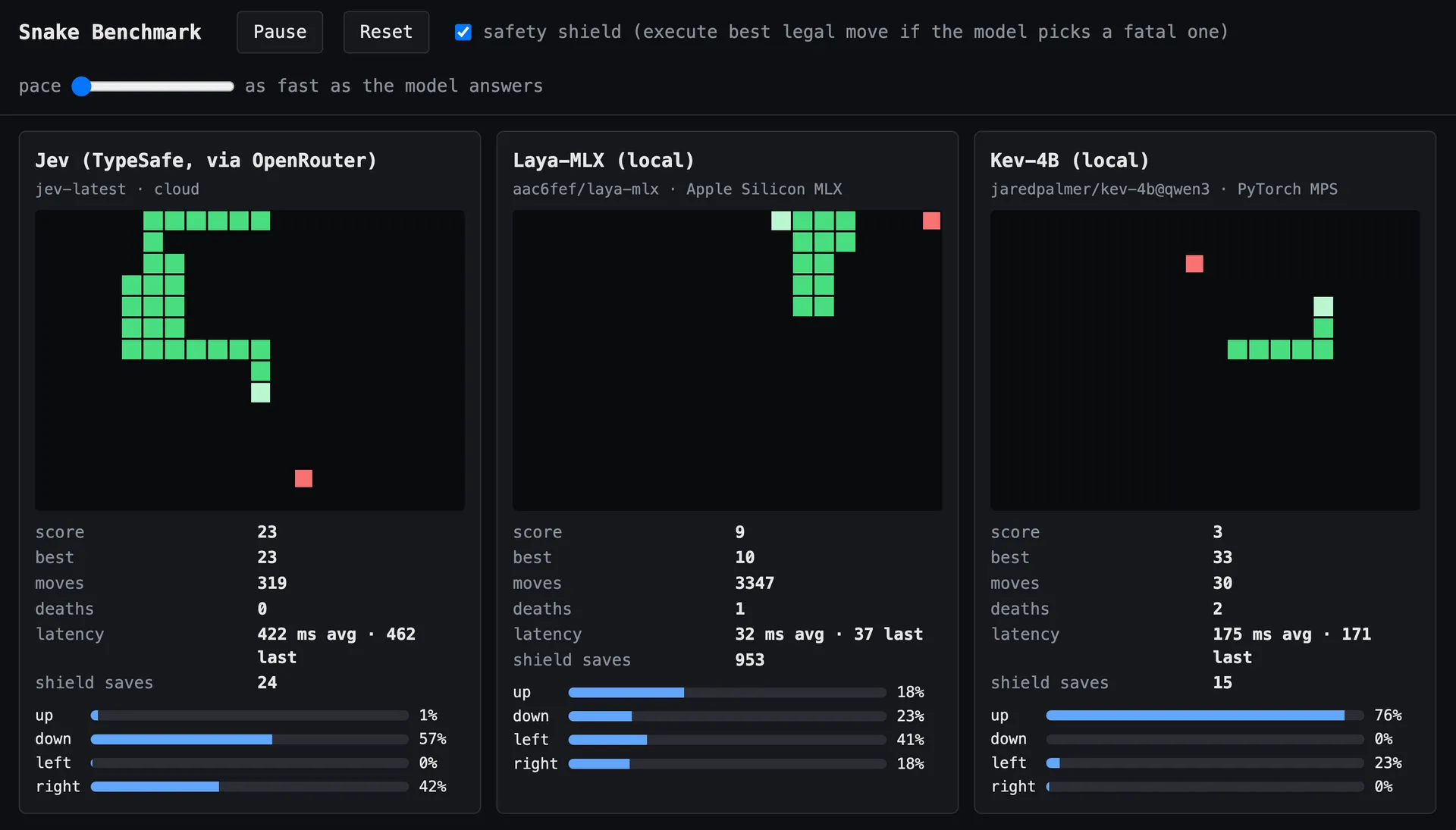
Snake game to benchmark the 3 decision models.
On the run I published, Jev had no deaths, at about 395 ms a move. Laya died early and then looped, catching nothing, at about 33 ms. Kev died twice in the same stretch, at about 175 ms 15. Better than Laya on that board, worse than Jev, and fast enough to run on a laptop.
Laya failing at Snake does not tell me it will mis-route an HVAC email. Kev lasting longer does not tell me it will read a process-skid spec. It told me the local models are real enough to try on a narrow decision, and that I should measure them on the decision I'm actually looking to automate, with my thresholds. For Laya, that requires a fine-tune. I would not use the base model for anything serious.
Jev is already being used in many different ways. One public example drives a Google Flights search and is written to stop when the options are on screen. It does not select a flight, and it does not book one 16. I have also seen routers that pick which chat model should run, and classifiers aimed at documents. The useful part is the boundary. The model picks from a list. The code does the execution part.
I will put a judgment step like this in front of agents that already touch quotes, tickets, and incoming mail. The chat model keeps the writing. The code keeps doing the math. Jev, or a local model, comes in once I have measured it, answers the questions I am tired of seeing buried in a prompt: what is this, is it complete, whose job is it, is it allowed to go out.
If the workflow starts from documents rather than an email, the document parsing still has to happen first. I have written up a local document pipeline for that part separately, including invoice intake where an agent pays, files, or flags 17. The decision model is plugged in after that initial reading; it is not replacing it.
- "Jev launch post". Diogo Almeida, TypeSafe AI, on X. 15 September 2026. View count checked 24 September 2026.
- "Introducing System One Models and Jev". TypeSafe AI. 15 September 2026.
- "Jev on OpenRouter". OpenRouter. Model page: Jev 1.13.
- "Models". TypeSafe AI documentation. Price, context length, rate limits, and data handling. Reviewed 24 September 2026.
- "Jev 1.13 jaggedness". TypeSafe AI documentation. Last reviewed 17 September 2026.
- "Is Jev as accurate as frontier models at classification?". OpenRouter. 22 September 2026.
- "System One". TypeSafe AI documentation. See also Choice and Score.
- "Noul". TypeSafe AI documentation.
- "Agent skill". TypeSafe AI documentation. Skill source: typesafe-ai/skills.
- "Jev on Vercel AI Gateway". Vercel. Promotional pricing noted on the page as ending 25 September 2026. Gateway question types: changelog.
- "Signup pause". TypeSafe AI, on X. 22 September 2026.
- "laya-mlx". Apple Silicon runtime for Laya. Latency figures from the project readme.
- "Laya". System One Models directory, drawing on the Convai Innovations model card and GitHub repo. Updated 22 September 2026.
- "Kev". Local decision models, including Kev-4B on Qwen3.5. Model card: Kev-4B.
- "Jev vs locally running Laya-MLX and Kev-4B". Tobias Wupperfeld, on X. 21 September 2026.
- "flights.py". browser-use/jev-ultrafast. The file's own note: calls TypeSafe, never selects or books a flight.
- "How to Build a Local AI Agent for Invoice Processing". Made by Agents. Related: Best Open Source OCR for AI Agents.
About the author

Tobias Wupperfeld
Tobias is an independent AI engineer and operator who has shipped AI systems inside startups and scale-ups across fintech, procurement, engineering, and more. He runs Made By Agents focused on agentic coding and consults for companies, where he leads AI integration across processes and product lines.
Keep Reading
More Guides From the Blog
We write about coding agents, multi-agent systems, AI pair programming, and the engineering practices we use with clients. Hands-on lessons from real projects, not high-level theory.
Browse All Articles