- Services
An agent is just a loop. How to schedule a Python AI agent with GitHub Actions for free, with two working examples and no framework.
📝 Audio Version
Ditch AI Frameworks for Plain Python Agents
You keep hearing that you need a framework or a monthly subscription to build AI agents. I stopped using both for most of what I build. For a large class of useful agents you can schedule a Python AI agent with GitHub Actions, pay nothing for the compute, and keep every line of the logic in your own repo.
This post is the whole setup. What an agent actually is, what a framework costs you, the workflow file, the secrets, two agents I actually run, and the parts of GitHub Actions that are important to keep your workflow running reliably.
No. An agent is a loop. You send a prompt to a model, you run whatever tool the model asks for, you feed the result back, and you repeat until the model stops asking. That is it. For a scheduled job that runs once a day and either succeeds or does not, the loop is a few dozen lines of Python and one HTTP call.
This is not a fringe position. Anthropic's own engineering guidance tells developers to use the model APIs directly first, because most agent patterns take only a few lines of code, and warns that frameworks add abstraction layers that hide the actual prompts and responses and make debugging harder 1.
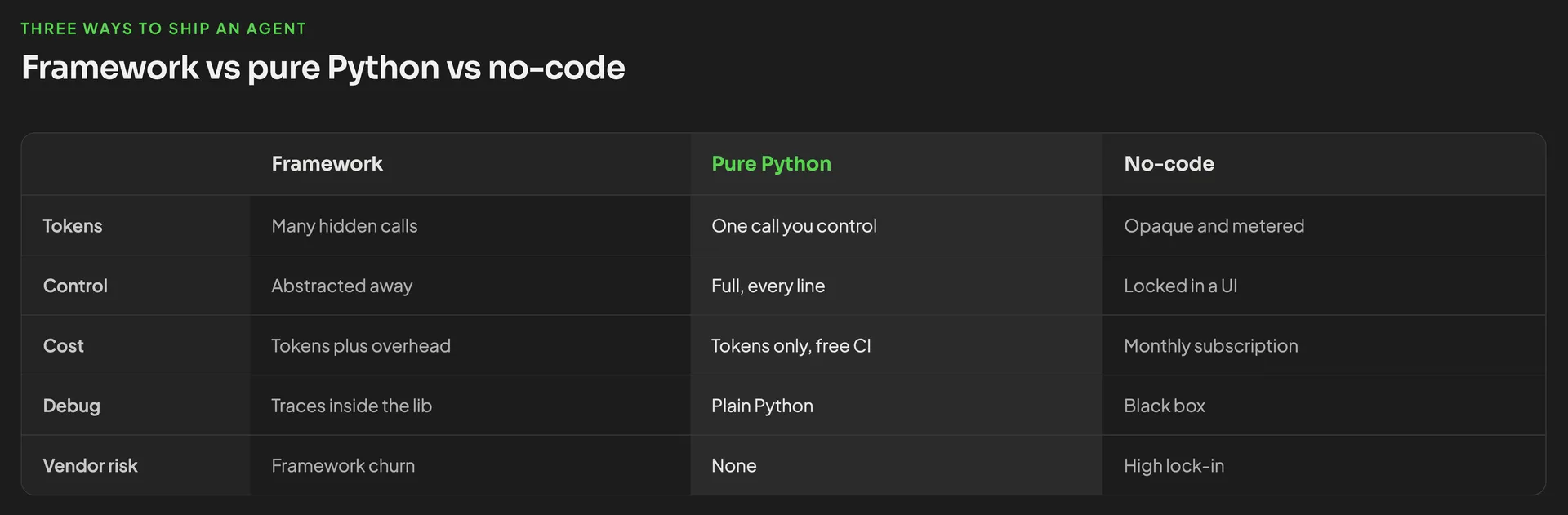
Frameworks are not evil. They cost you four specific things, and it is worth being precise about which ones apply to you.
Every layer of abstraction puts something in the context window. Injected system prompts, tool schemas, retry wrappers, hidden intermediate calls. You pay for all of it on every single call, and in a loop that multiplies.
Tool schemas are the part people underestimate. At 50 or more tools, the schemas alone eat 5 to 7 percent of the context window before your first instruction arrives, and reliability falls off a cliff rather than degrading gently. One benchmark had large models scoring 19 out of 20 at twenty tools and failing outright at 107. GitHub Copilot cut its own tool count from 40 down to 13 and got back around 400ms of latency plus two to five points of accuracy 3.
I built an agent cost calculator to make this visible. You pick your workflow shape, your models, your rough token counts and your retry rate, and it shows you the same job priced across different frameworks. The spread is not subtle. The same multi-agent workflow can land at under two dollars per task on one framework and over seventeen on another, and the framework overhead is usually the single biggest line item, ahead of the model tokens themselves.
You get the library's own bugs, which you cannot fix on your schedule. And you get a second, sneakier problem: your coding agent does not reliably know the current framework API. Model training data lags behind a library that ships breaking changes monthly, so Claude or Codex confidently writes code against a signature that no longer exists, and you spend the afternoon on a bug that plain Python would never have produced.
Plain Python does not have that failure mode. The language did not change last week.
pip install langchain pulls in a few hundred transitive packages. Every one of them is a maintainer account somebody can phish.
This is not theoretical. In March 2026, two malicious versions of litellm shipped to PyPI. The attacker got in through a compromise of Trivy, a security scanner sitting inside litellm's own CI pipeline, and the bad release included a .pth file that executed on every Python process start, not just on import. It was live for well under an hour on a package doing roughly three million downloads a day 4. Sonatype counted 454,648 new malicious packages in 2025 alone, and their framing is the right one: the poisoned package is usually the first step into a CI pipeline, not the whole attack 5.
Note what litellm is, though. It is a thin wrapper. Fewer dependencies lower your odds; it does not make you immune. And "pure Python" is never literally zero: you still want an HTTP client and probably a provider SDK. The honest claim is three dependencies instead of three hundred.
People lump these together and it weakens the argument, so let me separate them.
Open-source frameworks are not much of a lock-in risk in the commercial sense. LangGraph, CrewAI and Pydantic AI are permissively licensed and self-hostable. If one gets abandoned you are left holding a working fork, which is annoying but survivable. The real cost there is architectural: the framework's abstractions become your architecture, and migrating means rewriting your control flow. The 12-Factor Agents write-up puts it better than I can. Own your prompts, and own your control flow, because owning the loop is what lets you step out of it to wait on a human 6.
No-code platforms are the actual lock-in. A margin on top of your token usage, a subscription, someone else's interface, a fixed set of models, no way to read the prompt that was really sent, and usually no clean export. When something breaks you file a ticket and wait. Gartner expects more than 40 percent of agentic AI projects to be cancelled by the end of 2027, and points out that only around 130 of the thousands of vendors claiming to sell agents are actually selling agents 7.
The clean dividing line is whether your agent needs to survive things.
A stateless job that runs for ninety seconds, does its work, and exits is exactly right for a plain script. The moment your agent runs for hours, pauses mid-run to wait for a human approval, has to survive a deploy, or must not repeat side effects after a crash, you want real checkpointed execution. That is what tools like Temporal and LangGraph's persistence layer are for, and hand-rolling it is a bad trade.
If you want the middle ground, look at Hugging Face's smolagents. The whole agent implementation is about a thousand lines and the abstractions stay close to the raw code 8. Even framework authors now compete on being small.
Every agent I run this way has the same four parts:
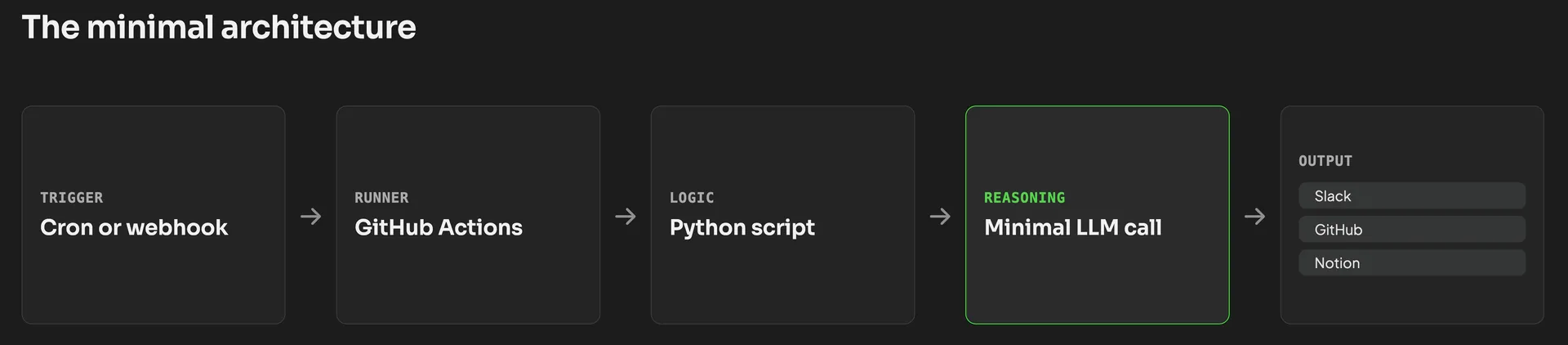
The runner is the interesting part, because GitHub gives it to you for free. Here is a complete workflow file that runs an agent every morning:
1name: arxiv-digest23on:4 schedule:5 - cron: '17 6 * * *'6 workflow_dispatch:7 inputs:8 dry_run:9 description: 'Print the digest instead of posting it'10 type: boolean11 default: true1213permissions:14 contents: read1516jobs:17 digest:18 runs-on: ubuntu-latest19 timeout-minutes: 1020 steps:21 - uses: actions/checkout@v522 - uses: actions/setup-python@v623 with:24 python-version: '3.12'25 - run: pip install -r requirements.txt26 - name: Run the agent27 env:28 GEMINI_API_KEY: ${{ secrets.GEMINI_API_KEY }}29 SLACK_WEBHOOK_URL: ${{ secrets.SLACK_WEBHOOK_URL }}30 DRY_RUN: ${{ inputs.dry_run || 'false' }}31 run: python -m agents.arxiv_digest
Four things in there are deliberate and worth copying.
workflow_dispatch gives you a Run workflow button in the Actions tab, so you can test without waiting for tomorrow. The dry_run input lets that test print its output instead of posting it. permissions: contents: read strips the job down to read-only, because naming any permission sets every unnamed one to none 9. And the cron is 17 6, not 0 6, for a reason I will come back to.
Yes, with one condition. On public repositories, GitHub-hosted runners are free and unmetered. On private repositories you get a monthly allowance of included minutes: 2,000 on the Free plan, 3,000 on Pro and Team, 50,000 on Enterprise Cloud. Past that, a Linux two-core runner bills at $0.006 per minute 10.
Do the arithmetic for a daily agent. Two minutes a day is about 60 minutes a month, or 3 percent of the Free private allowance. You would need to run twenty of these before compute became a line item. Windows counts double against your quota and macOS counts tenfold, so stay on ubuntu-latest.
Now the three things that will bite you.
GitHub does not guarantee that a scheduled workflow starts on time. The schedule event queues behind everything else on the platform, and delays of 15 to 20 minutes are routine, with reports of 50 to 60 minutes at busy moments. Runs scheduled for popular slots can be dropped entirely 11.
Two rules follow. Never schedule on the hour, and never at midnight UTC, because that is where everyone else piles up. Pick something scruffy like 17 6 * * *. And never write an agent whose correctness depends on the exact minute it ran. Cron here means "roughly daily", not "at 06:00".
Schedules are always in UTC. There is no timezone setting. If you want 8am local through a daylight saving change, you either accept the hour of drift or you run twice and let the script decide.
In a public repository, GitHub automatically disables scheduled workflows once the repo has had no activity for 60 days 12. Activity means something that changes the repo, like a push or a merged PR. Stars and issue comments do not count.
This is the failure mode that gets people. Your digest just stops arriving and nothing tells you why. Either commit to the repo occasionally, add a keepalive workflow that makes a trivial commit, or make the agent itself write its run log back to the repo, which solves this and the next problem at once.
A late run followed by a retry can execute your agent twice. If your agent posts a digest or opens a pull request, that means duplicates.
The fix is a dedupe key and about ten lines of code. Keep a JSON file of IDs you have already handled, arXiv paper IDs or advisory IDs, commit it back at the end of each run, and skip anything already in it. This is the one bit of framework-like plumbing worth writing yourself, because you get to choose what "already handled" means.
Four steps:
GEMINI_API_KEY, and paste the value.${{ secrets.GEMINI_API_KEY }}, mapped into env: on the step that needs it.Locally, keep the same names in a .env that is listed in .gitignore, and read both the same way:
1import os23api_key = os.environ["GEMINI_API_KEY"]
Use os.environ[...] rather than os.getenv(...). A missing key then fails loudly on line one instead of sending an unauthenticated request twenty lines later.
This is the most re-asked question in this whole area, so here is the answer. Secrets are not automatically visible to your code. They have to be mapped into env: on the specific step that uses them. A secret declared at the workflow level but not passed to the step arrives as nothing. And if you stored it as an environment secret rather than a repository secret, the job also needs an environment: key naming that environment.
One more: a workflow triggered by a pull request from a fork never gets your secrets, and its token is read-only no matter what you configure 9. That is a feature. It means a stranger cannot open a PR that prints your API key.
If your agent touches GitHub itself, do not reach for a classic token. Go to Settings, Developer settings, Personal access tokens, and create a fine-grained token. Set an expiry, scope it to the repositories it actually needs, and give it two permissions only: Contents read and write, so it can read code and push a branch, and Pull requests read and write, so it can open the PR. Nothing else.
This is the one I would build first. It has no incumbent product competing with it and it cannot do any damage.
The agent fetches the day's papers in the categories you care about, has a cheap model summarise five to ten of them, and posts one consolidated message to a Slack channel with links to the abstract and the PDF. Mine runs in about ninety seconds.
Two limits to respect. arXiv asks for no more than one request every three seconds on a single connection, and asks you to build that delay into your code with backoff rather than hammering and retrying 13. Slack allows one message per second per channel and returns a 429 with a Retry-After header when you exceed it 14. Which is a good reason to post one digest message rather than one message per paper. Your readers will prefer that anyway.
Setting up the Slack side takes about two minutes:
api.slack.com/apps and create a new app from scratch, pick your workspace.SLACK_WEBHOOK_URL, locally and as a GitHub secret.An incoming webhook is the right choice here because it posts to exactly one channel and can do nothing else. A bot token is more capable, which in a security context is the wrong direction. Only reach for a bot token if you need threads, reactions, file uploads or multiple channels.
Here is the agent from the video, and here is the caveat it needs.
The shape is four steps. Pull fresh advisories from a public vulnerability database. Match them against your dependency list. Have a cheap fast model judge whether each match actually matters to you. Have a stronger coding model draft the fix and open a draft pull request.
The matching step deliberately has no model in it. Comparing a version against an affected range has one correct answer, and putting a language model in front of it adds a failure mode where none needed to exist. Determinism where determinism is available.
Now the caveat: Dependabot already does most of this, for free, on every GitHub plan. It fetches advisories, matches them against your manifests, and opens PRs, across thirty-plus ecosystems 15. If you build this agent to replace Dependabot you have wasted a weekend. Build it for the layer Dependabot's free tier does not give you: your own triage rules about what counts as urgent in your codebase, judgment about whether the vulnerable function is one you actually call, or an attempt at the real fix rather than a version bump. Custom auto-triage rules from GitHub otherwise sit behind Code Security at $30 per committer per month, which is exactly the gap worth filling yourself.
For the data source, start with OSV.dev. No key, no charge, and no published rate limit 16. The NVD API allows five requests per rolling 30 seconds without a key and fifty with one, and the key is free, so get one if you go that route 17.
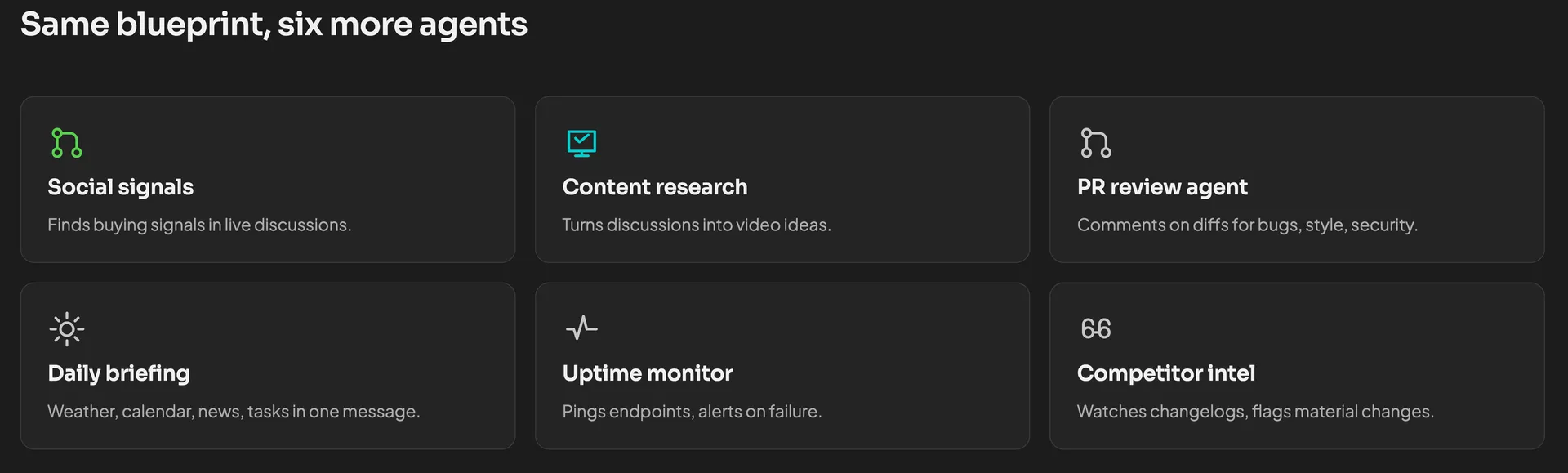
The security agent above is also the most dangerous thing in this post, so let me be specific about why.
Simon Willison calls it the lethal trifecta: access to private data, exposure to untrusted content, and the ability to communicate externally. Any one of the three is fine. All three together mean text written by an attacker can make your agent exfiltrate your data, and no amount of prompt engineering closes that hole, because the attack vector is language itself 18.
A patch agent has all three. It reads your private repo. It ingests text you do not control, including advisory descriptions and upstream changelogs. And it can write to GitHub. The fix is structural, not a better prompt:
The rest of the checklist:
permissions: block on the job, and no tool that can spend money or write to production..env in .gitignore and keep the repo private unless you meant to open source it.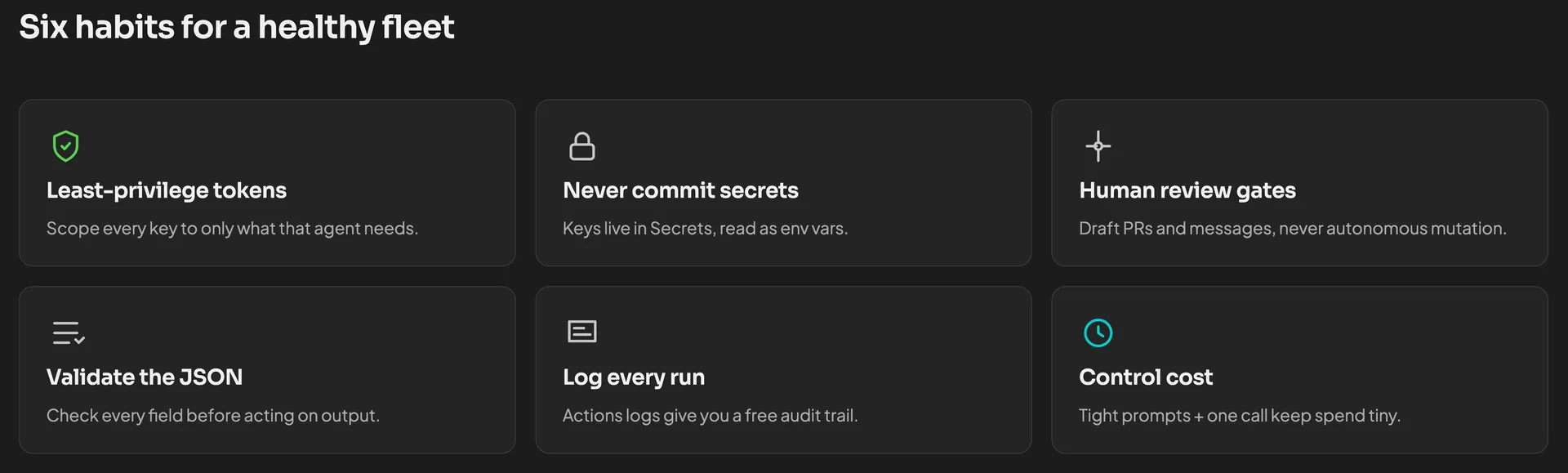
The compute is genuinely zero on a public repo and effectively zero on a private one. So the whole cost is model tokens.
For the arXiv digest, the token math is easy to estimate before you build anything: roughly ten abstracts in, a short summary out, one call per run, thirty runs a month. On a cheap fast model that is cents. The patch agent costs more because the drafting step wants a stronger model, but it only reaches that step for advisories that survive the deterministic match, which on most repos is a handful a month rather than a daily event. Our API price tracker has current per-million rates if you want to put real numbers on your own design.
And the honest part. Writing it yourself does not automatically make it cheaper. It makes it _legible_. You can see every token you spend and decide whether you want to. That is the actual win, and if you use it to spend less, you spend less.
Do I need LangChain to build an AI agent? No. An agent is a loop that prompts a model, runs any tool it asks for, feeds the result back, and repeats. For a scheduled job that is a few dozen lines of Python plus a provider SDK. Frameworks earn their place when you need durable execution, not when you need a daily digest.
Can you run an AI agent on GitHub Actions? Yes. A cron-triggered workflow that installs Python and runs your script is all it takes. It suits stateless agents that finish in minutes. It does not suit long-running agents that need to pause for approval or survive restarts.
Is GitHub Actions free for scheduled jobs? Free and unmetered on public repositories. On private repositories you get 2,000 Linux minutes a month on the Free plan, and Linux two-core minutes past that cost $0.006 each. A daily two-minute agent uses about 60 minutes a month.
Why is my scheduled GitHub Actions workflow running late? Scheduled runs queue behind other platform load and are commonly 15 to 60 minutes late, worst at the top of the hour and at midnight UTC. Schedule off-the-hour, and never write an agent that depends on the exact minute.
Why did GitHub disable my scheduled workflow? In a public repository, GitHub disables scheduled workflows after 60 days without repository activity. Pushes and merges count, stars and comments do not. Commit occasionally or add a keepalive.
Is it safe to store API keys in GitHub secrets? Reasonably, yes. Secrets are encrypted, masked in logs, and never exposed to workflows triggered from forks. You are trusting GitHub, which you already are with your code. Pair it with spend limits and key rotation.
How do I get structured output without a framework? Use the provider's strict JSON schema mode. OpenAI enforces the schema during decoding, so the model cannot emit a token that breaks it, which is a step up from the older best-effort JSON mode 19. Anthropic gets there through forced tool schemas. This removes one of the most common reasons people install a framework.
How do I get tracing without paying for LangSmith? Structured logs cover most of it. If you want real traces, the OpenTelemetry GenAI conventions now describe the agent lifecycle and plenty of tools already emit them. They are still marked experimental, so pin the version you build against.
Pick the smallest useful agent you can think of. A digest of something you already read manually, a monitor on something you check too often, an alert on a thing you keep missing. Write the loop, put it on a cron, point it at Slack.
You will know within a week whether it earned its place, and you will not have signed up for anything to find out.
About the author

Tobias Wupperfeld
Tobias is an independent AI engineer and operator who has shipped AI systems inside startups and scale-ups across fintech, procurement, engineering, and more. He runs Made By Agents focused on agentic coding and consults for companies, where he leads AI integration across processes and product lines.
Keep Reading
We write about coding agents, multi-agent systems, AI pair programming, and the engineering practices we use with clients. Hands-on lessons from real projects, not high-level theory.
Browse All Articles